¿Qué es el exchange cripto Hyperliquid y cómo funciona?
Cómo usar Hyperliquid: guía de trading paso a paso
Conectar monedero en Hyperliquid: crea o vincula tu cuenta
Depósito en Hyperliquid: cómo ingresar fondos
Perpetuos en Hyperliquid: elige un mercado y configura tu operación
Tipos de órdenes en Hyperliquid: cómo ejecutar y gestionar tus posiciones
App de Hyperliquid: cómo operar en Hyperliquid desde el móvil
Soporte de Hyperliquid en goodcryptoX: cómo operar en Hyperliquid desde el móvil
goodcryptoX y Hyperliquid: cómo operar con goodcryptoX
Tipos de órdenes avanzadas en Hyperliquid con goodcryptoX
Bots de trading en Hyperliquid: bots disponibles en goodcryptoX
Hyperliquid HIP-3: cómo operar en mercados HIP-3 mediante goodcryptoX
Plataforma de trading Hyperliquid: app nativa frente a goodcryptoX
Conclusión: cómo empezar a operar en Hyperliquid
Comparte este post
Hyperliquid lidera el sector de los exchanges descentralizados de perpetuos por volumen: a fecha de 24 de agosto, el volumen de negociación de Hyperliquid se sitúa en torno a los 6.900 millones de dólares en 24 horas y los 207.000 millones en los últimos 30 días. Esta plataforma totalmente on-chain y no custodial ofrece más de 300 mercados al contado (spot) y de perpetuos, incluidos los listados bajo el estándar HIP-3 que abarcan criptomonedas, acciones, índices, materias primas y otros activos.
A pesar de su popularidad, la plataforma puede resultar compleja de utilizar.
Por ello, esta guía de trading en Hyperliquid detalla todo el proceso paso a paso, desde cómo vincular una cuenta y realizar un depósito hasta abrir y gestionar una posición. Analizamos cómo operar en Hyperliquid mediante su interfaz nativa y cómo hacerlo a través de goodcryptoX aprovechando su aplicación móvil, tipos de órdenes avanzadas y bots de trading.
Las secciones finales explican cómo operar en Hyperliquid en los mercados HIP-3, cómo funcionan las comisiones de trading y una comparativa entre la interfaz nativa de Hyperliquid y goodcryptoX. Este contenido está orientado a traders que buscan ir más allá del trading básico en Hyperliquid y desean aprender cómo utilizar este DEX con herramientas adicionales de automatización.
¿Qué es el exchange cripto Hyperliquid y cómo funciona?
Hyperliquid es una blockchain de Capa 1 (Layer 1) diseñada para el trading on-chain, con mercados al contado y de perpetuos integrados de forma nativa en la red. Para quien se pregunte qué es el exchange de criptomonedas Hyperliquid, limitarse a calificarlo como un simple DEX deja fuera aspectos cruciales. Su capa de negociación opera a través de HyperCore, un sistema con libros de órdenes, motor de emparejamiento (matching engine) y lógica de márgenes totalmente on-chain. Cada orden, cancelación, operación y liquidación se procesa internamente en HyperCore.
Una respuesta práctica a cómo funciona Hyperliquid comienza por su libro de órdenes. La mecánica es similar a la de los exchanges centralizados (CEX): los usuarios introducen órdenes de compra y venta, y el sistema las empareja según la prioridad de precio y tiempo. El libro de órdenes reside en la propia cadena (on-chain) en lugar de almacenarse en los servidores de una empresa. Además, Hyperliquid ejecuta HyperEVM, un entorno compatible con la máquina virtual de Ethereum (EVM) para contratos inteligentes.
Para entender en qué consiste el trading en Hyperliquid, resulta útil analizar sus principales funcionalidades operativas. Los usuarios pueden adquirir activos en los mercados al contado (spot) o abrir posiciones largas (long) y cortas (short) mediante contratos perpetuos. Los contratos perpetuos carecen de fecha de vencimiento y utilizan pagos de financiación (funding rates), permitiendo gestionar las posiciones con margen cruzado (cross margin) o aislado (isolated margin). La inmensa mayoría de estos contratos utiliza USDC como garantía (colateral).
Cómo usar Hyperliquid: guía de trading paso a paso
Dejando a un lado la teoría sobre cómo usar Hyperliquid en la práctica, la mecánica es directa: conecta tu cuenta, deposita fondos, selecciona un mercado, define los parámetros de la operación y lanza tu orden. En las posiciones de perpetuos, esto implica elegir el apalancamiento y la modalidad de margen, para luego gestionar el stop-loss, el take-profit y el cierre de la orden una vez abierta la posición.
A continuación desglosamos el proceso para que aprendas a operar en Hyperliquid paso a paso, abarcando desde la conexión inicial del monedero y el depósito hasta la ejecución y gestión de órdenes.
Conectar monedero en Hyperliquid: crea o vincula tu cuenta
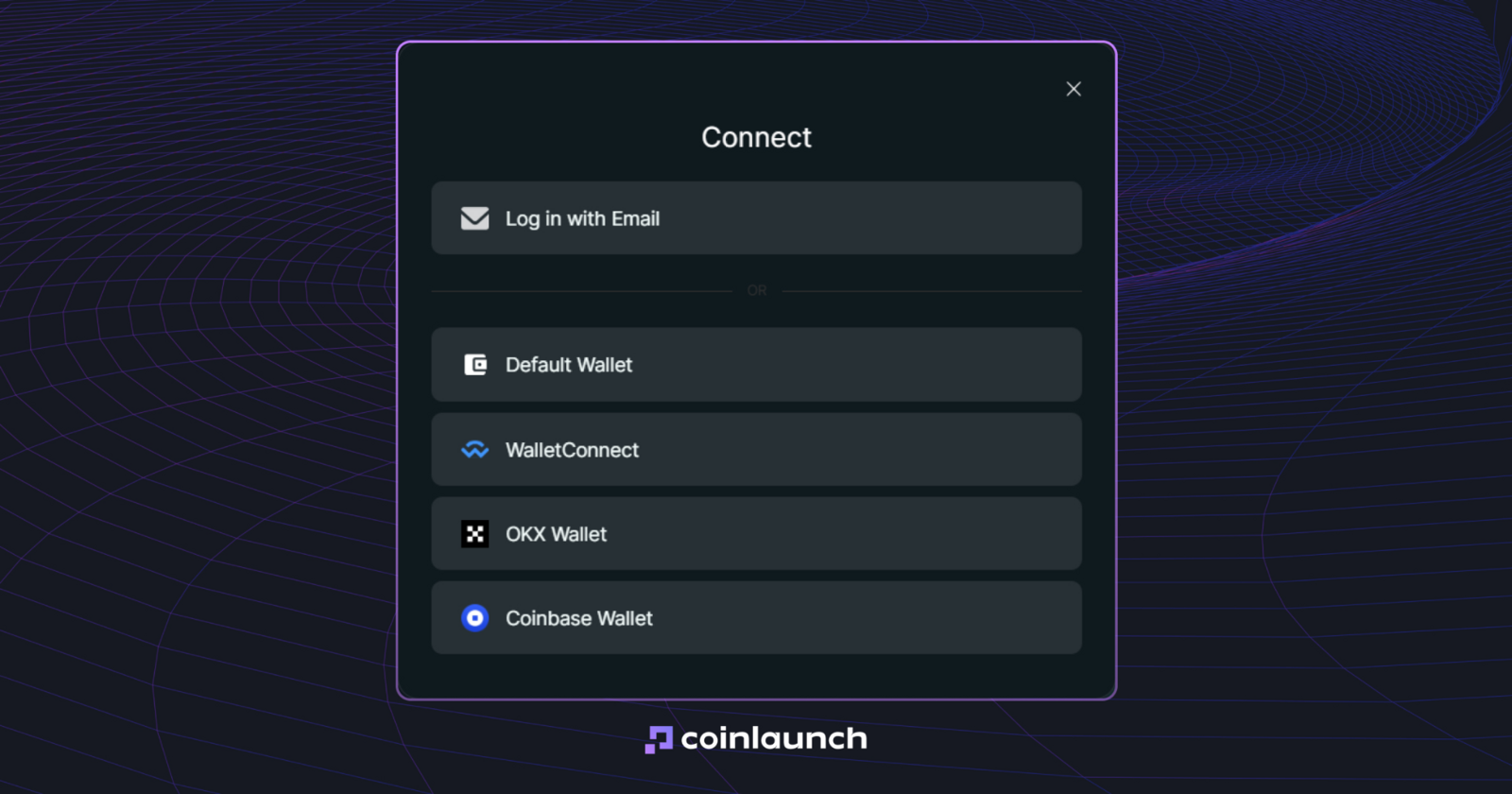
Puedes comenzar de dos formas: conectando una billetera DeFi existente o iniciando sesión con una dirección de correo electrónico. Hyperliquid es compatible con prácticamente cualquier billetera EVM, incluidas MetaMask, Rabby, Coinbase Wallet y WalletConnect. Si inicias sesión por correo electrónico, la plataforma genera una dirección de blockchain administrada directamente desde tu cuenta.
Interfaz de conexión de Hyperliquid. Fuente: Hyperliquid.xyz
Pasos para conectar tu monedero a Hyperliquid:
Entra en Hyperliquid y pulsa en Connect.
Selecciona tu billetera y confirma la conexión en su interfaz.
Haz clic en Enable Trading.
Firma la transacción sin coste de gas para completar la configuración de tu cuenta para depósitos y operaciones.
Si resides en una región restringida, es posible que necesites una VPN para acceder a la plataforma.
Si deseas saber cómo conectarte a Hyperliquid sin un monedero externo, elige la opción de inicio de sesión por correo electrónico. Hyperliquid te enviará un código de verificación de seis dígitos que, al introducirlo, creará automáticamente una nueva dirección de monedero para tu cuenta.
Depósito en Hyperliquid: cómo ingresar fondos
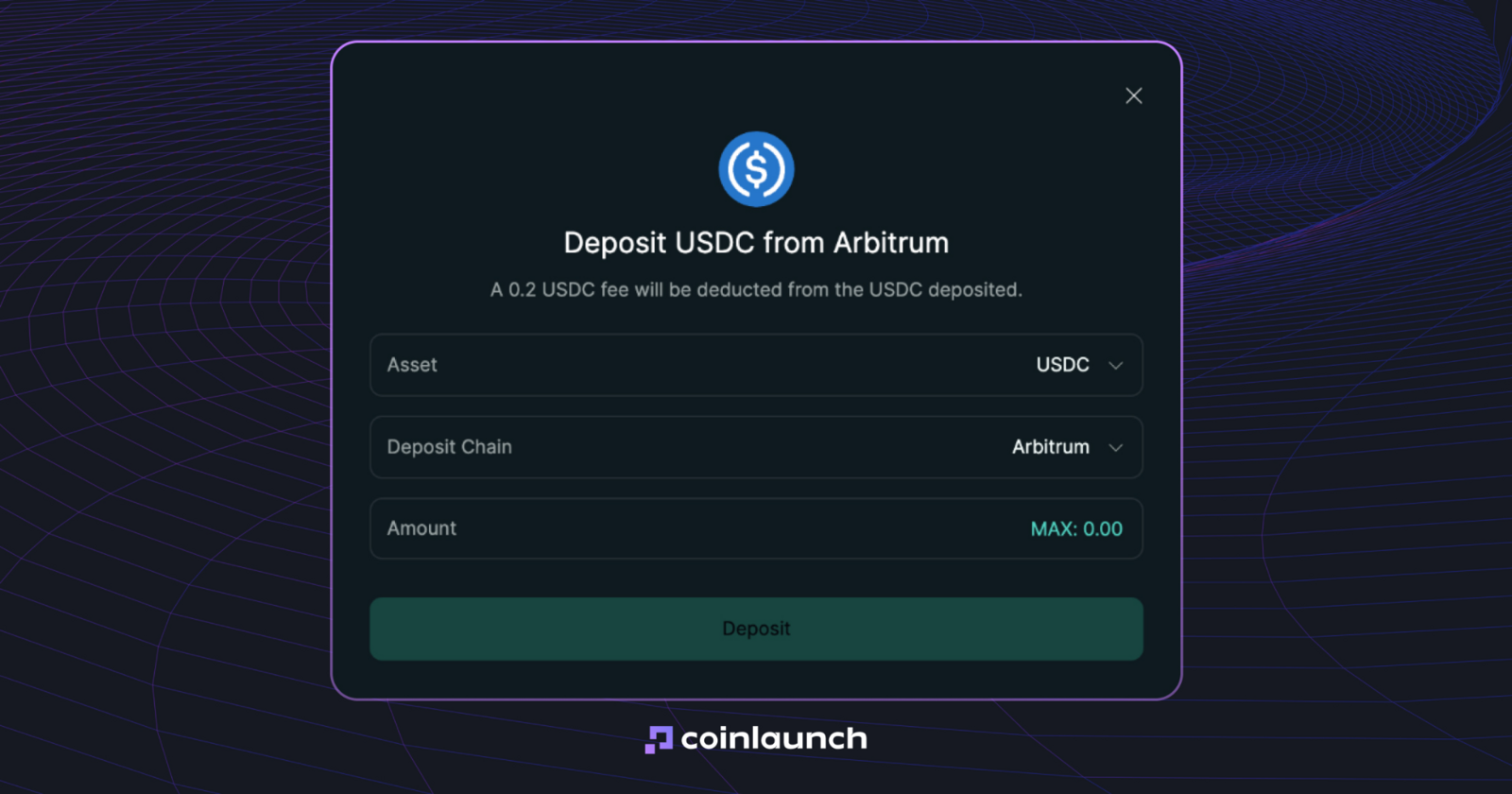
El método estándar para depositar fondos en Hyperliquid se realiza con USD Coin (USDC) a través de la red de Arbitrum. Necesitarás USDC y una pequeña cantidad de Ether (ETH) para cubrir las comisiones de gas de la transacción saliente. Si dispones de fondos en otra red, puedes transferirlos a Arbitrum mediante un puente (bridge) o retirarlos directamente desde un exchange centralizado.
Pasos para depositar en Hyperliquid:
Transfiere USDC y una pequeña cantidad de ETH a la red Arbitrum.
Dirígete a la interfaz de trading de Hyperliquid y haz clic en Deposit.
Introduce la cantidad de USDC que deseas ingresar y confirma la transacción en tu billetera conectada.
Espera la confirmación de la red; el saldo en USDC se acreditará en Hyperliquid, normalmente en menos de un minuto.
Antes de realizar el depósito, ten en cuenta el depósito mínimo en Hyperliquid: actualmente el umbral mínimo es de 5 USDC. Enviar una cantidad menor (por ejemplo, 4 USDC) provocará la pérdida de los fondos. Las cuentas creadas por correo electrónico son la única excepción: puedes efectuar una transferencia adicional de USDC para alcanzar el umbral requerido y se acreditará el total combinado.
En resumen, ingresar fondos en tu cuenta de Hyperliquid requiere una pauta muy clara: ten preparado USDC en Arbitrum y envía un mínimo de 5 USDC mediante la opción Deposit. Una vez acreditado, podrás usar el capital como garantía para posiciones de perpetuos o transferirlo libremente entre los saldos de Spot y Perps.
El mismo procedimiento se aplica para retirar fondos de Hyperliquid. Pulsa en Withdraw, introduce el importe de USDC y selecciona Withdraw to Arbitrum. Ejecutar una retirada en Hyperliquid no requiere pagar gas por tu parte: los validadores de la red procesan la salida mientras el protocolo descuenta una comisión fija de 1 $. Los fondos suelen llegar a tu monedero en cuestión de minutos.
Perpetuos en Hyperliquid: elige un mercado y configura tu operación
El producto estrella de la plataforma son los perpetuos de Hyperliquid, derivados financieros sin fecha de caducidad. Su cotización replica el activo subyacente mediante un mecanismo de financiación (funding), con intercambios de pagos entre posiciones largas y cortas cada hora. En consecuencia, cuando se habla de operar con futuros en Hyperliquid, se hace referencia a estos contratos perpetuos y no a futuros tradicionales con liquidación en fecha fija.
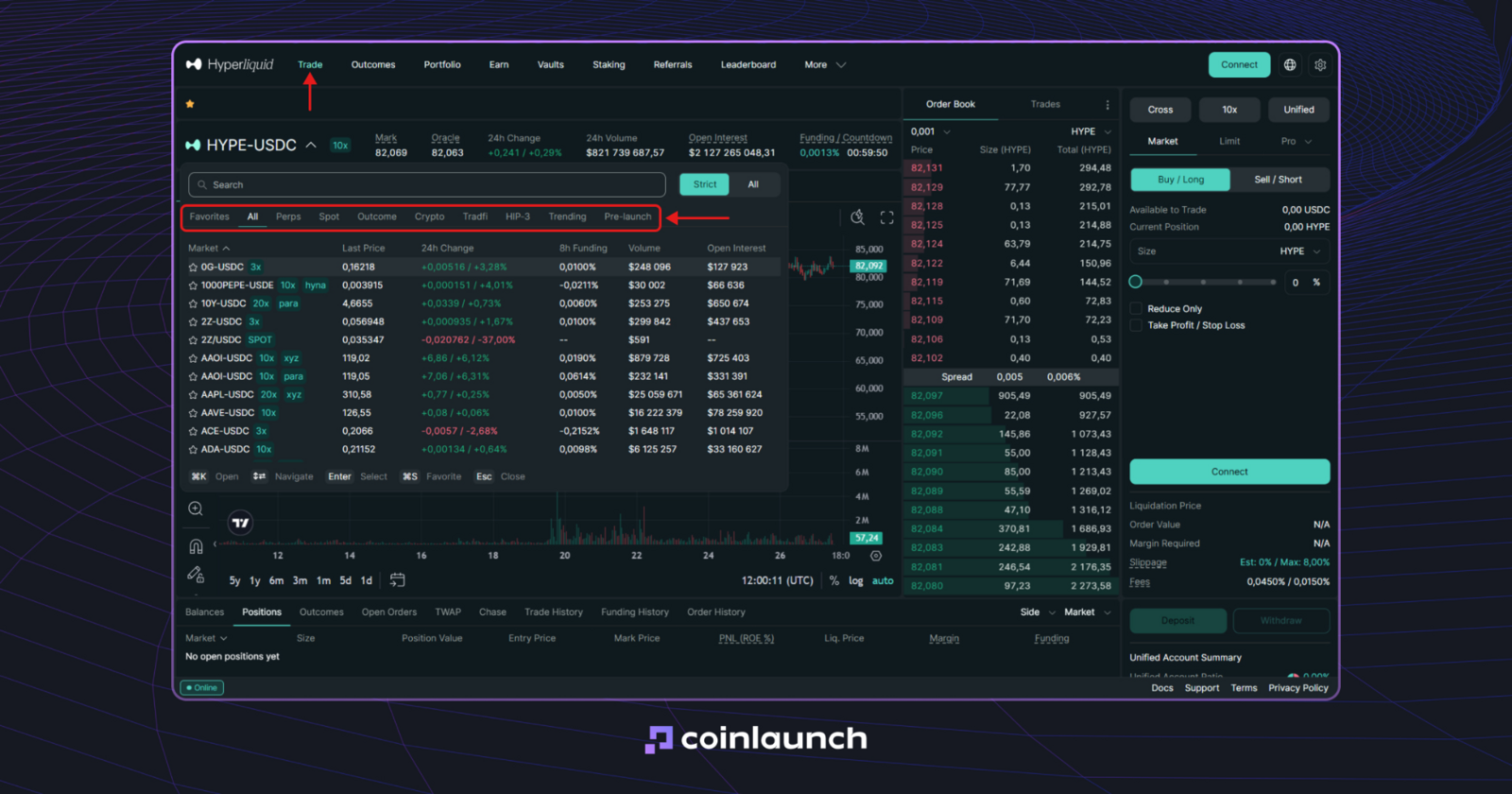
Mercados de perpetuos y otros activos en Hyperliquid. Fuente: Hyperliquid.xyz
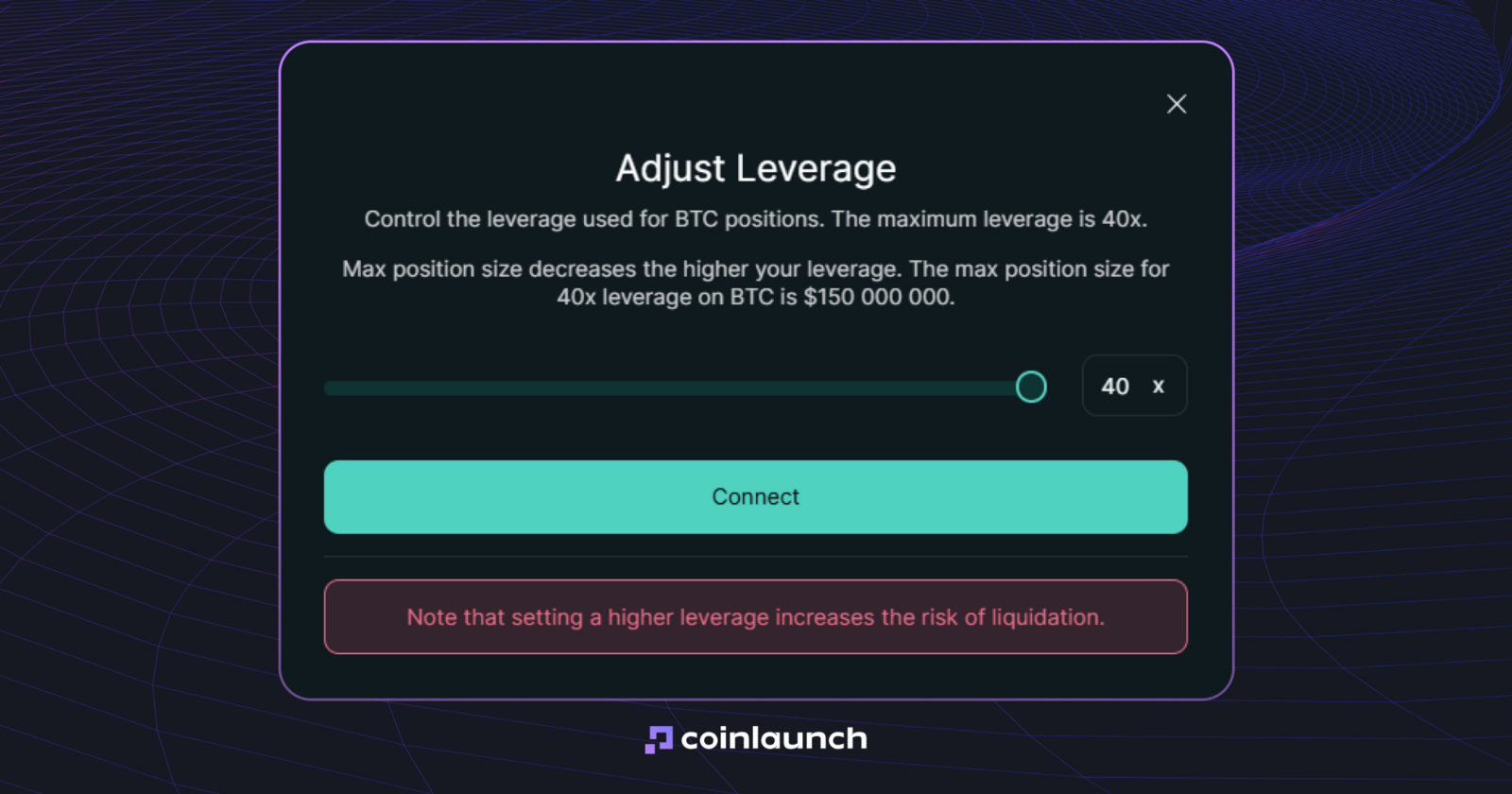
Para empezar a operar perpetuos en Hyperliquid, selecciona el mercado deseado en la parte superior del terminal, define el sentido de la posición (Long o Short) e indica el tamaño de la orden. El apalancamiento máximo varía según el activo, permitiéndote elegir valores enteros desde 1x hasta el límite fijado para ese mercado.
Ejemplo de límite de apalancamiento 40x para el par BTC/USDC. Fuente: Hyperliquid.xyz
Asimismo, debes seleccionar el modo de margen antes de lanzar la orden. Al optar por el margen cruzado (cross margin) en Hyperliquid, se unifica el colateral de todas las posiciones cruzadas en un balance de cuenta único. Con el margen aislado (isolated margin), la garantía se asigna en exclusiva a una operación concreta, garantizando que una liquidación no afecte al resto de posiciones aisladas o cruzadas. Ciertos activos únicamente admiten el modo aislado.
Ante la pregunta «¿admite Hyperliquid el trading al contado (spot)?», la respuesta es afirmativa. Basta cambiar de Perpetuals a Spot en el selector de mercados para escoger un par disponible. El trading al contado opera sin apalancamiento ni tasas de financiación, ya que los usuarios compran o venden el activo subyacente directamente en vez de abrir posiciones sobre derivados.
Tipos de órdenes en Hyperliquid: cómo ejecutar y gestionar tus posiciones
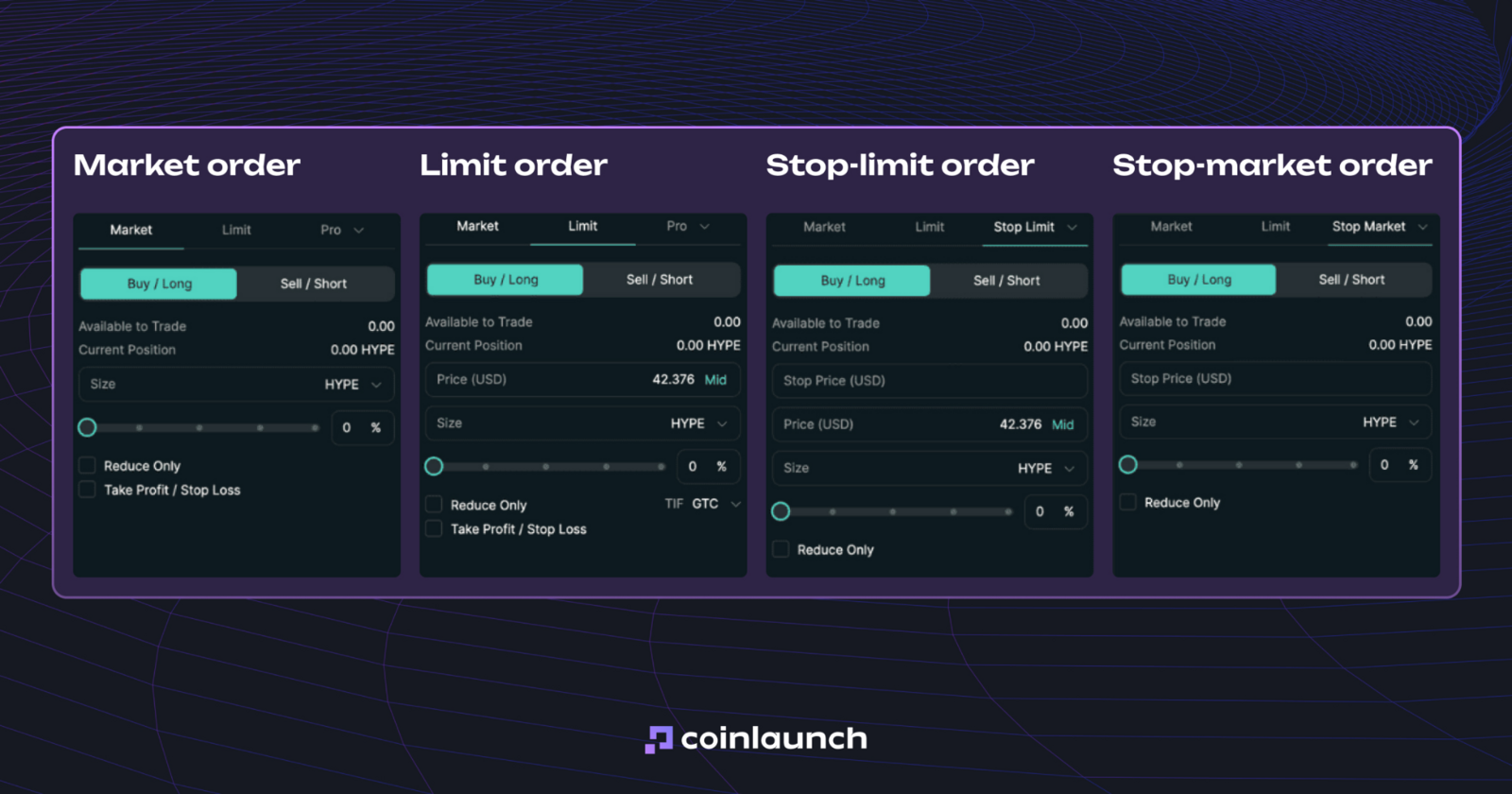
El catálogo de tipos de órdenes disponibles en Hyperliquid incluye órdenes Market, Limit, Stop Market, Stop Limit, Take Market, Take Limit, Scale y TWAP. Las órdenes a mercado (Market) se ejecutan de inmediato al precio actual, mientras que las órdenes límite (Limit) solo se ejecutan al precio especificado o a uno mejor. Las entradas y salidas condicionales se gestionan mediante órdenes Stop y Take. Las órdenes escalonadas (Scale) distribuyen múltiples órdenes límite a lo largo de un rango de precios definido, mientras que la orden TWAP fracciona una orden voluminosa en partes más reducidas enviadas a intervalos de 30 segundos.
Al enviar una orden límite en Hyperliquid, puedes elegir parámetros de ejecución como GTC (Good ’Til Canceled / Válida hasta cancelación), ALO (Add Liquidity Only / Solo añadir liquidez como maker) o IOC (Immediate or Cancel / Inmediata o cancelación). Las órdenes GTC permanecen en el libro hasta ejecutarse o cancelarse, ALO garantiza actuar estrictamente como creador de mercado (maker), e IOC ejecuta la liquidez disponible al instante cancelando el remanente no ejecutado. También puedes gestionar tus posiciones activas mediante las opciones Reduce Only, Take Profit y Stop Loss.
App de Hyperliquid: cómo operar en Hyperliquid desde el móvil
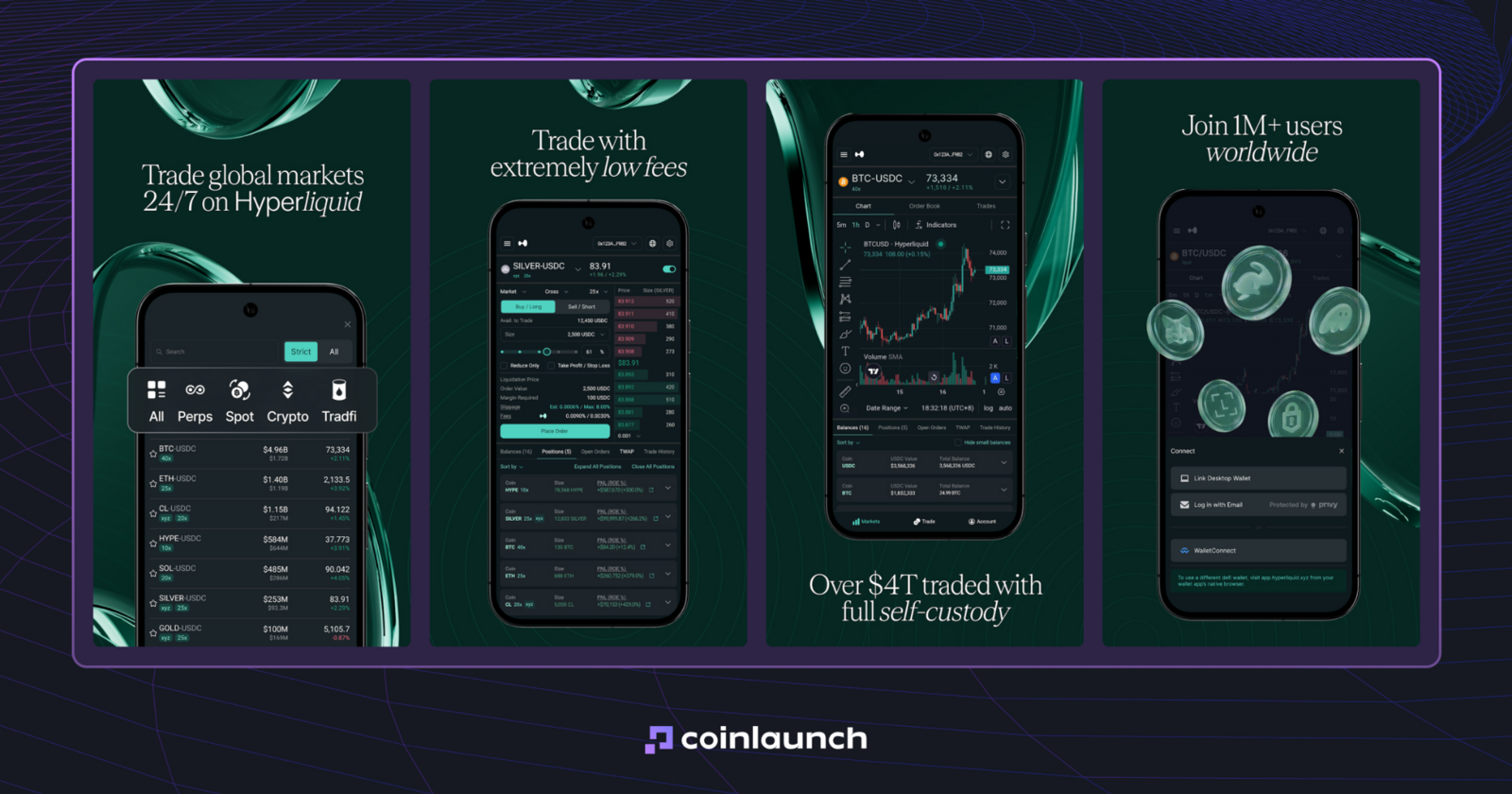
En 2026, la respuesta a si Hyperliquid dispone de app móvil depende del sistema operativo. La aplicación oficial de Hyperliquid está disponible actualmente en Android: desarrollada por Hyperliquid Corp, está publicada en Google Play con soporte para perpetuos, operaciones al contado, depósitos y retiradas, TWAP, órdenes TP/SL, margen de cartera y seguimiento de posiciones.
Inicialmente, el equipo lanzó la app móvil de Hyperliquid como un producto mínimo viable (MVP) básico con notificaciones push de operaciones, pero su versión actual ofrece un entorno de trading completamente funcional.
Interfaz de la app móvil de Hyperliquid en Android. Fuente: play.google.com
La situación cambia en el caso del iPhone. Por el momento no existe una app oficial de Hyperliquid para iOS en la App Store, por lo que la aplicación móvil oficial es exclusiva para usuarios de Android.
Los usuarios de iOS deben recurrir a la versión web móvil de Hyperliquid, lo cual resulta poco práctico para el trading frecuente. Para operar mediante una aplicación nativa en iOS, se puede recurrir a plataformas integradas como goodcryptoX. Sus aplicaciones para iOS y Android ofrecen las mismas opciones que su terminal web, incluyendo órdenes avanzadas, bots de trading sin código (Grid, DCA, Signals) y la gestión integral de tu cuenta de Hyperliquid vinculada.
Soporte de Hyperliquid en goodcryptoX: cómo operar en Hyperliquid desde el móvil
La integración de Hyperliquid en goodcryptoX emplea el mismo sistema de billetera API no custodial que el terminal web. Si ya tienes Hyperliquid conectado a tu cuenta de goodcryptoX, al iniciar sesión en la app móvil se sincronizan automáticamente la conexión, los perfiles de exchange, los bots de trading y los ajustes de cartera.
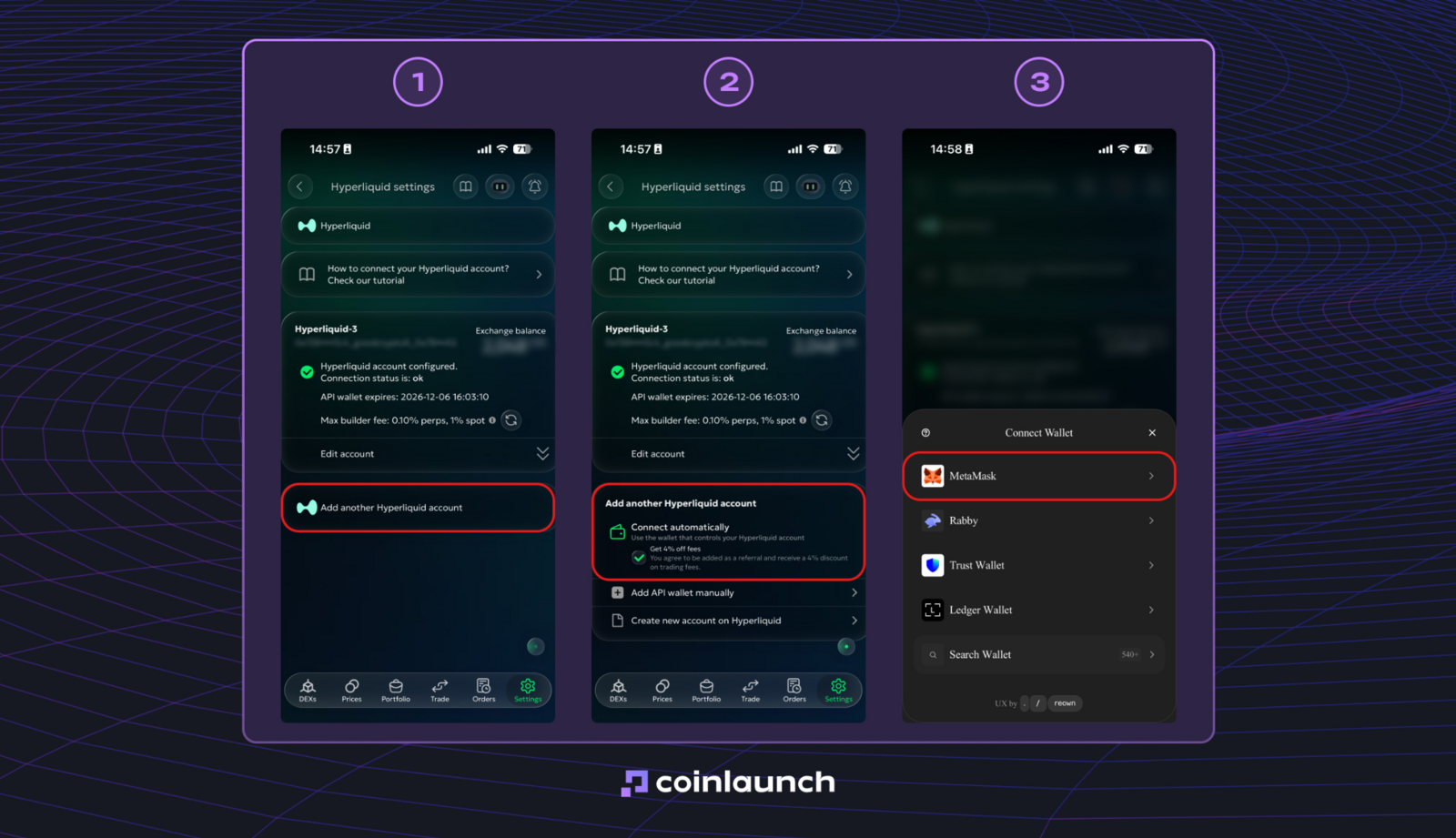
Si todavía no has vinculado tus cuentas, puedes configurarlo accediendo a Settings > Exchanges > Hyperliquid. MetaMask permite una configuración automática, mientras que otros monederos requieren la importación manual de la billetera API.
Interfaz de conexión de Hyperliquid en goodcryptoX. Fuente: goodcrypto.app
Una vez conectada, la billetera API queda guardada en goodcryptoX, evitando la molestia de tener que volver a conectar el monedero principal cada vez que quieras operar. Además, puedes conectar múltiples cuentas de Hyperliquid, alternar entre ellas desde una única interfaz y monitorizar saldos, posiciones y rendimiento en conjunto con el resto de tu cartera.
A la hora de buscar cómo operar en Hyperliquid en el móvil, goodcryptoX ofrece una solución directa. La plataforma traslada todas las herramientas de escritorio a iOS y Android: gestión de posiciones abiertas, configuración de órdenes avanzadas, seguimiento de carteras y ejecución de bots Grid o DCA (promedio de coste en dólares) directamente desde tu smartphone.
A diferencia de las alternativas nativas de Hyperliquid, goodcryptoX proporciona una experiencia operativa completa mediante app en iOS, subsanando la ausencia de una aplicación oficial para iPhone.
goodcryptoX y Hyperliquid: cómo operar con goodcryptoX
La integración de Hyperliquid en goodcryptoX está orientada a operadores que buscan maximizar el potencial de Hyperliquid sin renunciar a su modelo no custodial. El terminal de goodcryptoX adquiere permisos exclusivos para colocar órdenes, sin acceso alguno a retiradas de fondos. La ejecución se mantiene íntegramente en Hyperliquid, mientras que el terminal incorpora herramientas de trading avanzadas propias de los mejores CEX sobre el propio exchange.
Esta configuración resulta ideal tanto para inversores nóveles como para perfiles experimentados. La interfaz hace intuitivas herramientas complejas sin requerir programación, mientras que los traders activos obtienen un control milimétrico sobre entradas, salidas y automatizaciones.
Operar en Hyperliquid a través de goodcryptoX aporta ventajas notables en automatización y gestión de riesgos. La plataforma incluye bots Grid y DCA, órdenes Trailing Stop, esquemas de Take Profit en varios niveles, disparadores de Stop Loss que se ajustan automáticamente tras ejecutarse un Take Profit, y ejecución de órdenes o bots mediante webhooks de TradingView. Todo ello accesible desde las apps móviles de iOS y Android para gestionar tu cuenta de Hyperliquid desde el teléfono.
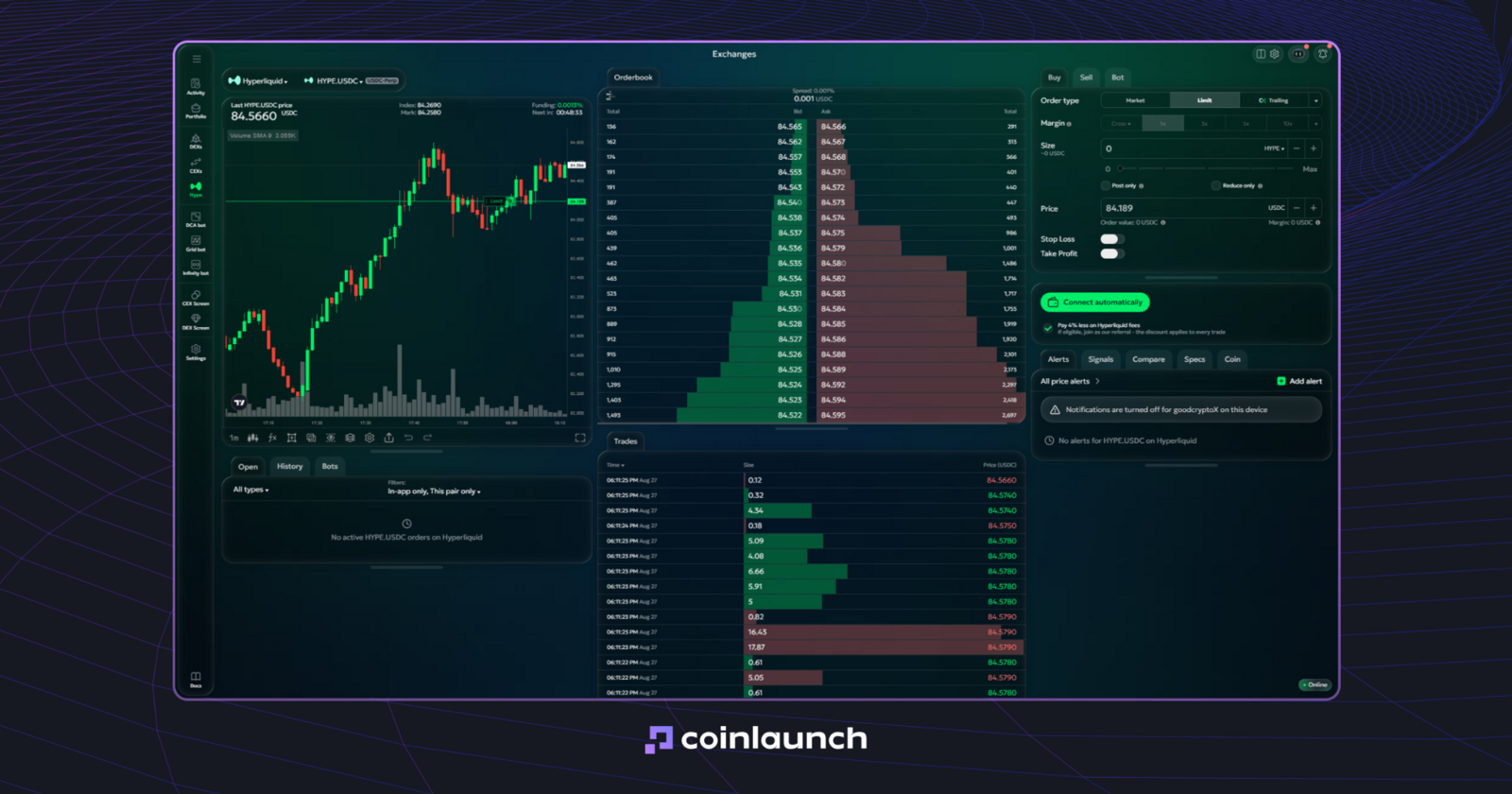
Terminal de trading de goodcryptoX con el par HYPE/USDC como ejemplo. Fuente: goodcrypto.app
Hyperliquid aporta el acceso al mercado y la ejecución de órdenes, mientras que goodcryptoX añade tipos de órdenes complejas, automatizaciones sin código, gestión móvil unificada de cuentas y seguimiento conjunto de carteras junto a otros exchanges y monederos.
Tipos de órdenes avanzadas en Hyperliquid con goodcryptoX
Las órdenes avanzadas de Hyperliquid en goodcryptoX trasladan herramientas profesionales de gestión de posiciones a este DEX sin necesidad de transferir fondos a un exchange custodial. Amplían las órdenes Market y Limit estándar con mecánicas dinámicas (trailing), Take Profits multiobjetivo, Stop Loss autoajustables y activadores mediante webhooks.
Estas herramientas operan directamente sobre tu cuenta vinculada de Hyperliquid, integrándose en la misma ventana operativa donde defines opciones de compra/venta, márgenes, apalancamiento y tamaño de la posición.
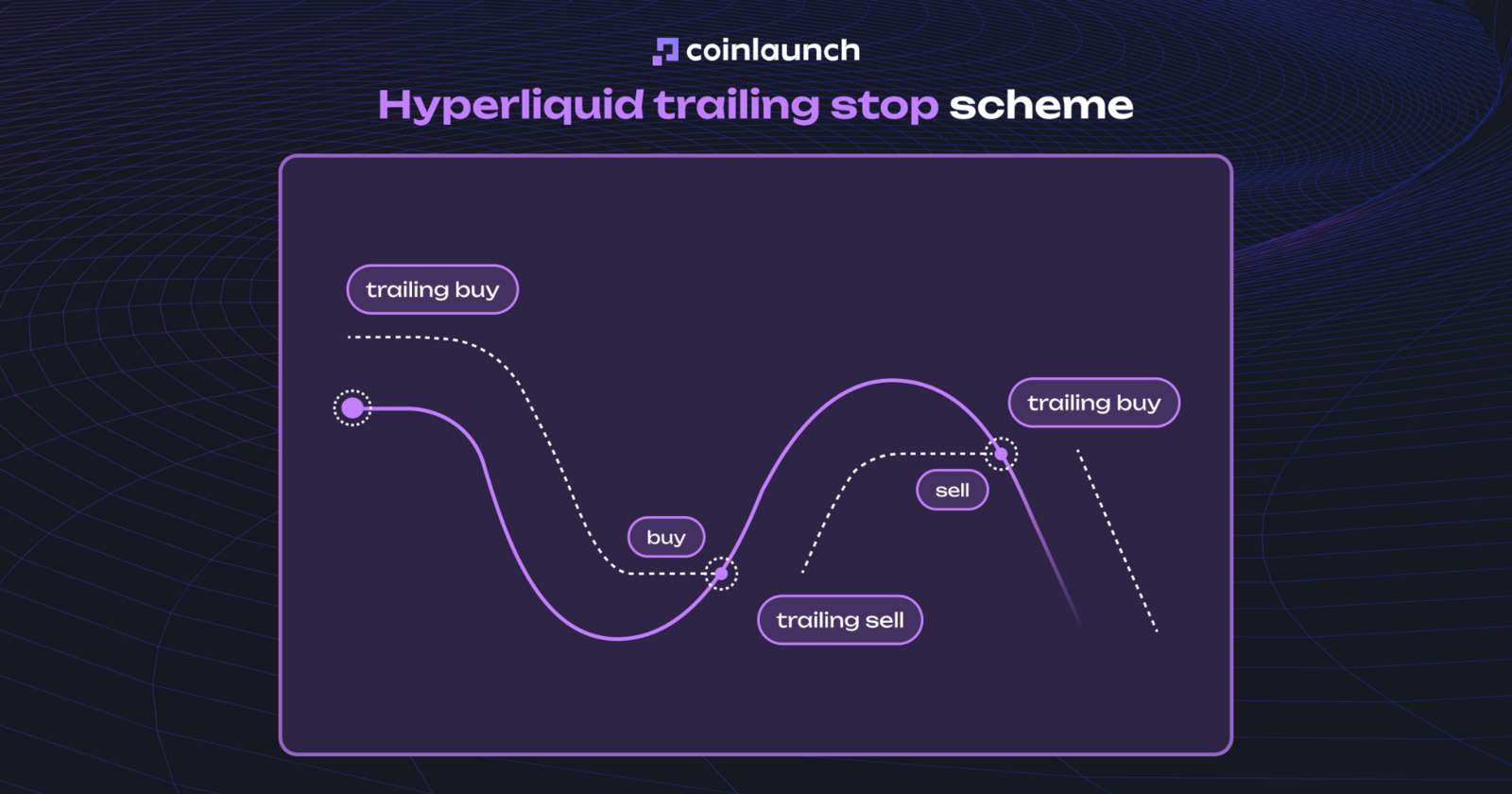
Trailing Stop en Hyperliquid. A diferencia de una orden stop convencional, el Trailing Stop rastrea el precio de mercado de forma dinámica. El nivel de activación se desplaza con el precio a una distancia predeterminada: en órdenes de compra desciende durante las caídas y se activa cuando el precio rebota al alza; en órdenes de venta sube con el mercado y se activa en los retrocesos. Esto permite utilizar el Trailing Stop tanto para entradas oportunas como para salidas protegidas.
Esquema del Trailing Stop en Hyperliquid. Fuente: goodcrypto.app
Elige Trailing en el desplegable de tipo de orden.
Introduce el tamaño (Size) y la distancia de seguimiento (Trailing Distance).
Activa Trailing Start si lo deseas, lo cual pospone el seguimiento del precio hasta que el mercado alcance una cotización objetivo o reciba una señal webhook de TradingView.
Pulsa Send para registrar la orden en la pestaña Orders hasta su ejecución o cancelación.
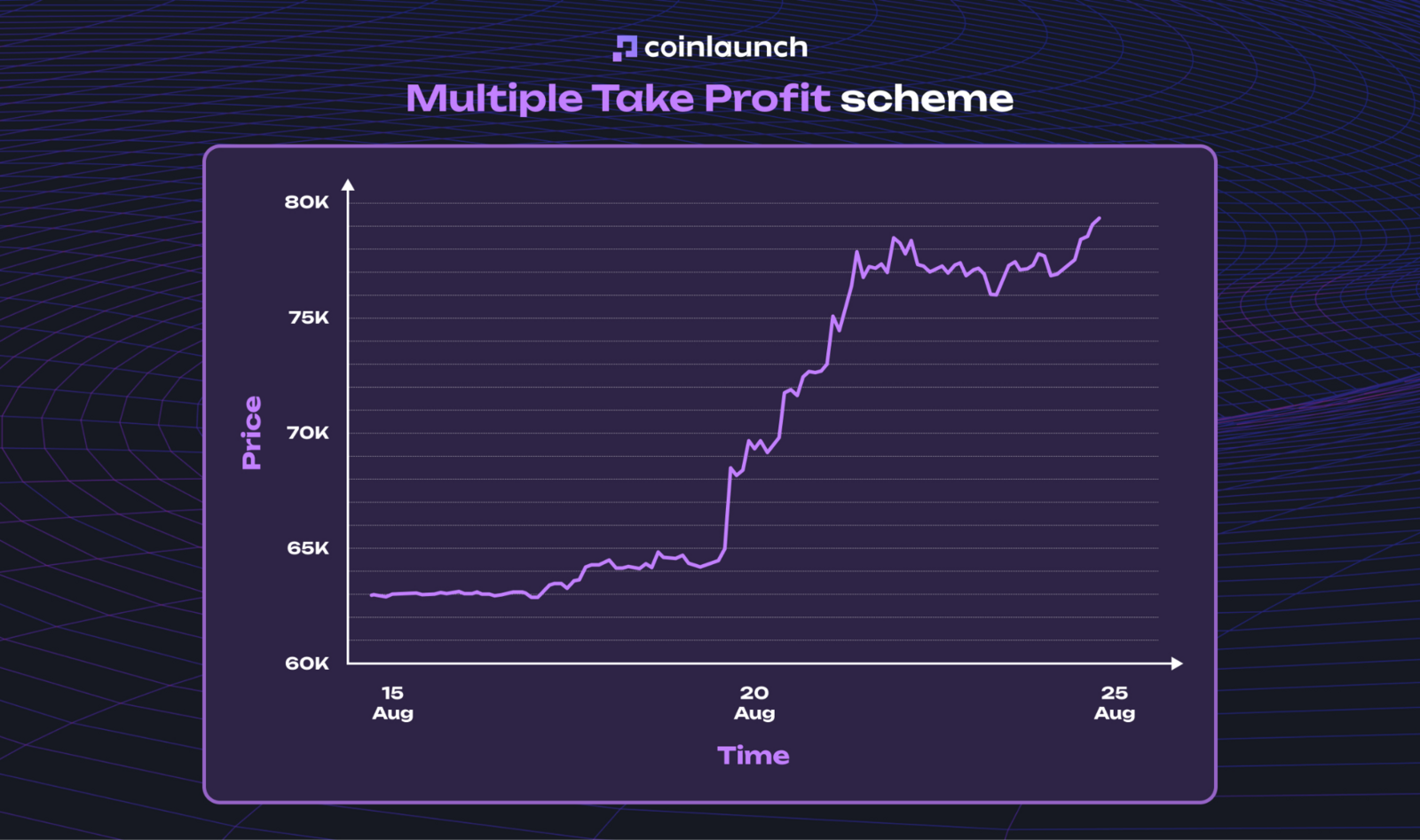
Múltiples Take Profit y Stop Loss con Auto-Follow. Las estrategias de salida conforman otra ventaja clave. En lugar de fijar un único Take Profit, puedes definir varios precios objetivo para cerrar una posición de forma escalonada. Además, puedes vincular tu Stop Loss a estos niveles de TP para que se recalcule y mueva automáticamente a medida que se alcancen los objetivos de beneficio.
Puedes configurar estos parámetros directamente en el formulario de la orden:
Crea una orden inicial Market, Limit o Trailing.
Activa las casillas de Stop Loss y Take Profit.
Introduce un precio objetivo o un porcentaje de desviación respecto al precio de entrada para el TP.
Haz clic en «+» para añadir objetivos adicionales de TP y fija el porcentaje de posición a cerrar en cada nivel.
Establece el precio de activación o la distancia desde la entrada para tu Stop Loss.
Activa Auto-Follow si deseas que el SL avance asegurando beneficios a medida que se ejecute cada TP.
Pulsa Send Order para finalizar.
Una vez ejecutada la orden principal, goodcryptoX genera automáticamente las órdenes vinculadas de SL y TP.
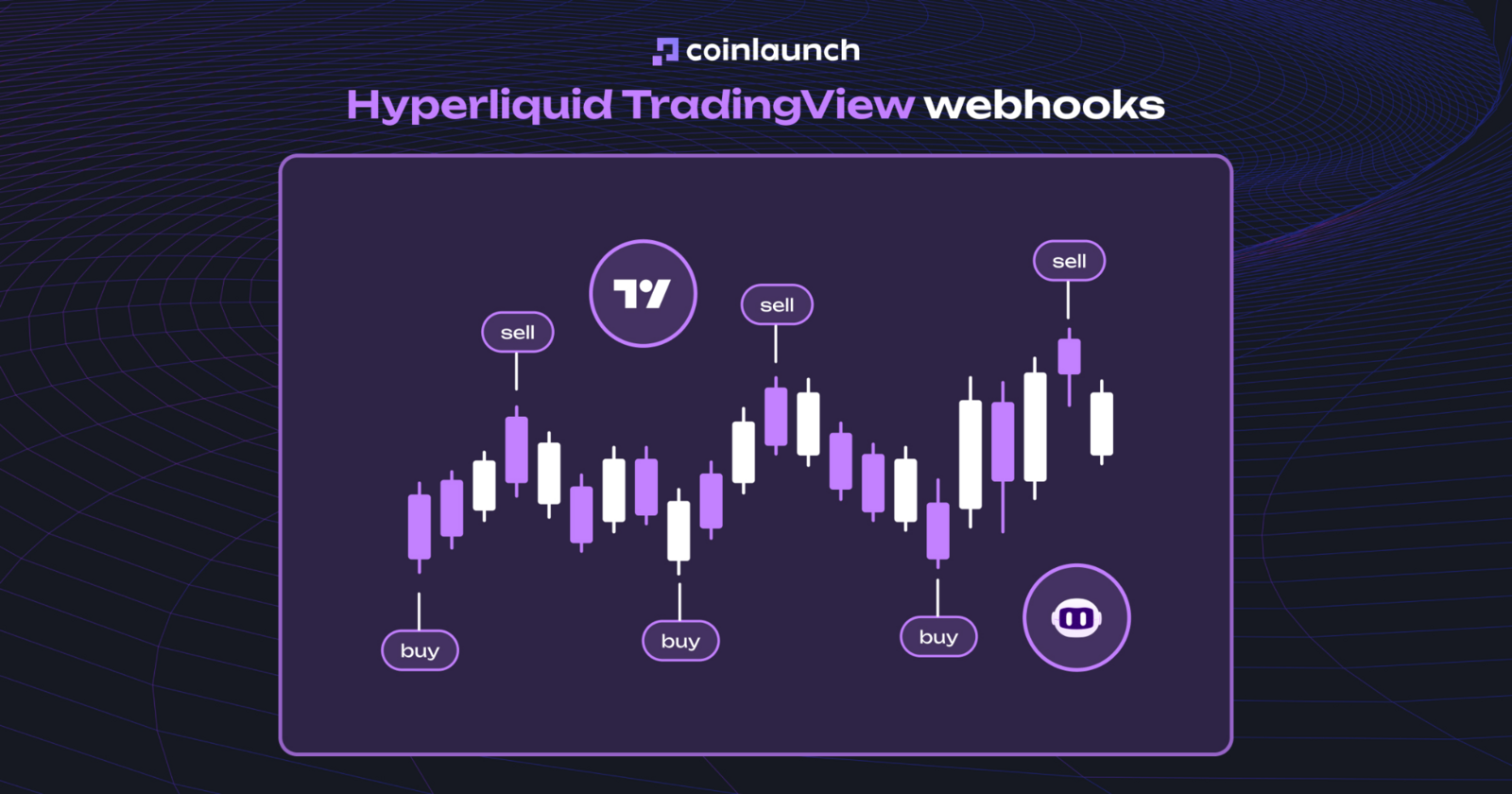
Automatización mediante webhooks. Los activadores externos en goodcryptoX permiten ejecutar o cancelar órdenes a partir de señales de cualquier aplicación capaz de emitir webhooks, incluyendo TradingView, n8n, Zapier, agentes de IA y otros servicios. Al elegir Webhook como tipo de disparador (Trigger Type) en lugar de un precio, goodcryptoX genera URLs específicas para acciones de apertura, cancelación, Stop Loss y Take Profit.
Webhooks de TradingView en Hyperliquid. Fuente: goodcrypto.app
Configuración de automatización mediante TradingView:
Configura la orden y selecciona Webhook como Trigger Type.
Abre la orden en la pestaña Orders.
Localiza la sección Web hooks en los detalles de la orden y copia la URL de la acción correspondiente.
Crea una alerta en TradingView.
Activa la opción Webhook URL en las notificaciones y pega la dirección facilitada por goodcryptoX.
Guarda la alerta.
En cuanto se cumpla la condición en TradingView, la solicitud enviada a esa URL desencadenará la acción programada en goodcryptoX.
Por su parte, las órdenes TWAP operan de forma nativa en Hyperliquid, dividiendo grandes órdenes en una serie de ejecuciones fraccionadas en el tiempo. goodcryptoX amplía estas opciones básicas incorporando mecánicas trailing, Take Profits multiobjetivo, Stop Loss con seguimiento dinámico y automatizaciones vía webhook.
Bots de trading en Hyperliquid: bots disponibles en goodcryptoX
Un bot de trading para Hyperliquid en goodcryptoX opera directamente sobre tu cuenta conectada. Puede crear y ajustar órdenes, pero nunca obtiene permisos de retirada de fondos. La automatización supone la principal mejora frente a la interfaz nativa, permitiendo que los bots operen de forma ininterrumpida en segundo plano sin necesidad de programar código, scripts o alquilar servidores propios.
goodcryptoX proporciona dos estrategias automatizadas principales para Hyperliquid: el bot Grid y el bot DCA. En el trading con Grid, el sistema divide un rango de precios en niveles predeterminados y coloca órdenes automatizadas entre ellos. El bot DCA, por su parte, añade órdenes de seguridad cuando el mercado se mueve en contra de la posición, recalculando dinámicamente el precio medio de entrada y los objetivos de Take Profit.
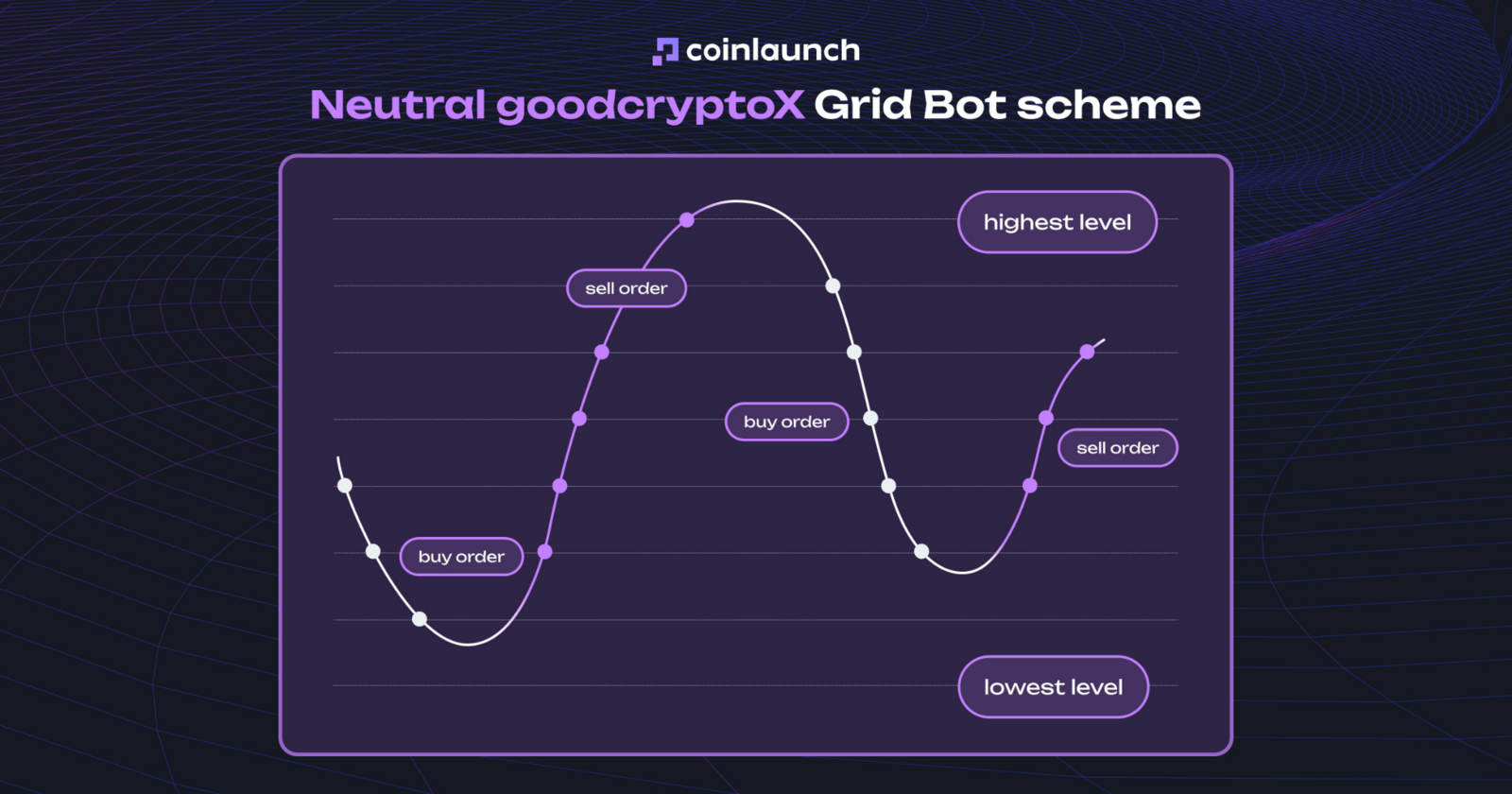
Bot Grid. La lógica del bot Grid en Hyperliquid depende del modo escogido. El Grid Neutral coloca órdenes de compra por debajo del precio actual y de venta por encima. El Grid Long abre de inmediato una posición larga, utilizando los niveles inferiores para promediar a la baja y los superiores para salidas parciales. El Grid Short replica este esquema en posiciones cortas.
Esquema del bot Grid Neutral en goodcryptoX. Fuente: goodcrypto.app
Selecciona Hyperliquid y el mercado de perpetuos deseado.
Elige entre Grid Neutral, Long o Short.
Fija el límite superior (Upper Price Limit) e inferior (Lower Price Limit) para delimitar el rango de actuación.
Indica el número de niveles del Grid para que goodcryptoX distribuya las órdenes automáticamente.
Introduce el capital asignado y el apalancamiento.
Haz clic en Start Bot.
Una vez activo, el bot comenzará a colocar órdenes dentro de los límites fijados. Si la cotización rompe el rango establecido, la colocación de nuevas órdenes del Grid se pausará automáticamente.
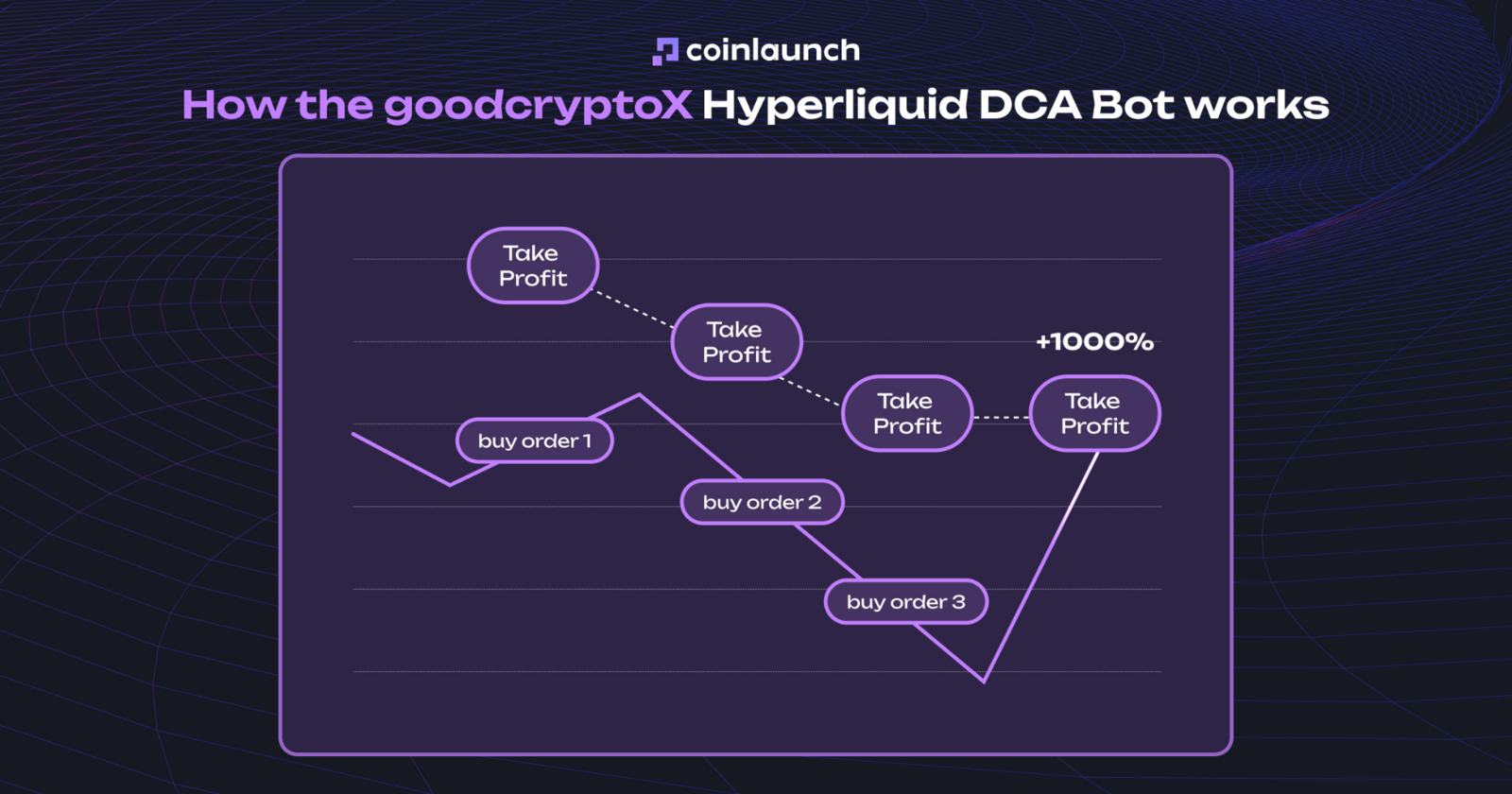
Bot DCA. El bot DCA de goodcryptoX gestiona posiciones combinando una orden inicial con sucesivas órdenes de seguridad. Si el precio evoluciona en contra de la entrada, las órdenes de seguridad ejecutadas reducen el precio medio, recalculando automáticamente el Take Profit sobre ese nuevo promedio.
Cómo funciona el bot DCA de goodcryptoX para Hyperliquid. Fuente: goodcrypto.app
La configuración admite los modos de asignación Partial Cost (Coste parcial) y Full Cost (Coste total). Partial Cost reserva margen únicamente para las órdenes de seguridad inmediatas en lugar de inmovilizar de antemano el capital de toda la secuencia.
Para configurar un bot DCA:
Selecciona DCA Bot en la pestaña Bots.
Elige Hyperliquid y el par de perpetuos a operar.
Escoge entre Partial Cost o Full Cost.
Define el tamaño de la orden inicial, el tamaño de las órdenes de seguridad y el número de pasos de seguridad.
Indica la distancia para el Take Profit.
Activa el Stop Loss y define los parámetros de riesgo si lo precisas.
Introduce el capital total destinado.
Haz clic en Start Bot.
Esta estrategia cuenta con integración nativa con TradingView. Mediante webhooks es posible activar órdenes de seguridad concretas u otras acciones según alertas de indicadores técnicos, utilizando las mismas URLs exclusivas de webhook.
goodcryptoX también permite replicar operativas en Hyperliquid mediante la importación y compartición de configuraciones de bots. En lugar de copiar pasivamente cada transacción individual de otra cuenta, esta función de copy trading se apoya en un código de configuración de seis caracteres.
Para copiar una estrategia:
Consigue el código de configuración de seis caracteres.
Abre el menú de bots y pulsa en Import/Copy Bot.
Pega el código.
Revisa los parámetros cargados automáticamente.
Introduce el capital asignado y haz clic en Start Bot.
El código transfiere todos los parámetros de la estrategia (par, espaciado del Grid, órdenes de seguridad, modo de coste y parámetros de TP/SL), permitiéndote ajustar el capital asignado antes de iniciar el bot.
Hyperliquid HIP-3: cómo operar en mercados HIP-3 mediante goodcryptoX
Hyperliquid HIP-3 actúa como un estándar para contratos perpetuos desplegados por desarrolladores externos, lo que permite a terceros lanzar mercados de perpetuos personalizados sobre la infraestructura central de Hyperliquid definiendo pares, oráculos y parámetros de mercado.
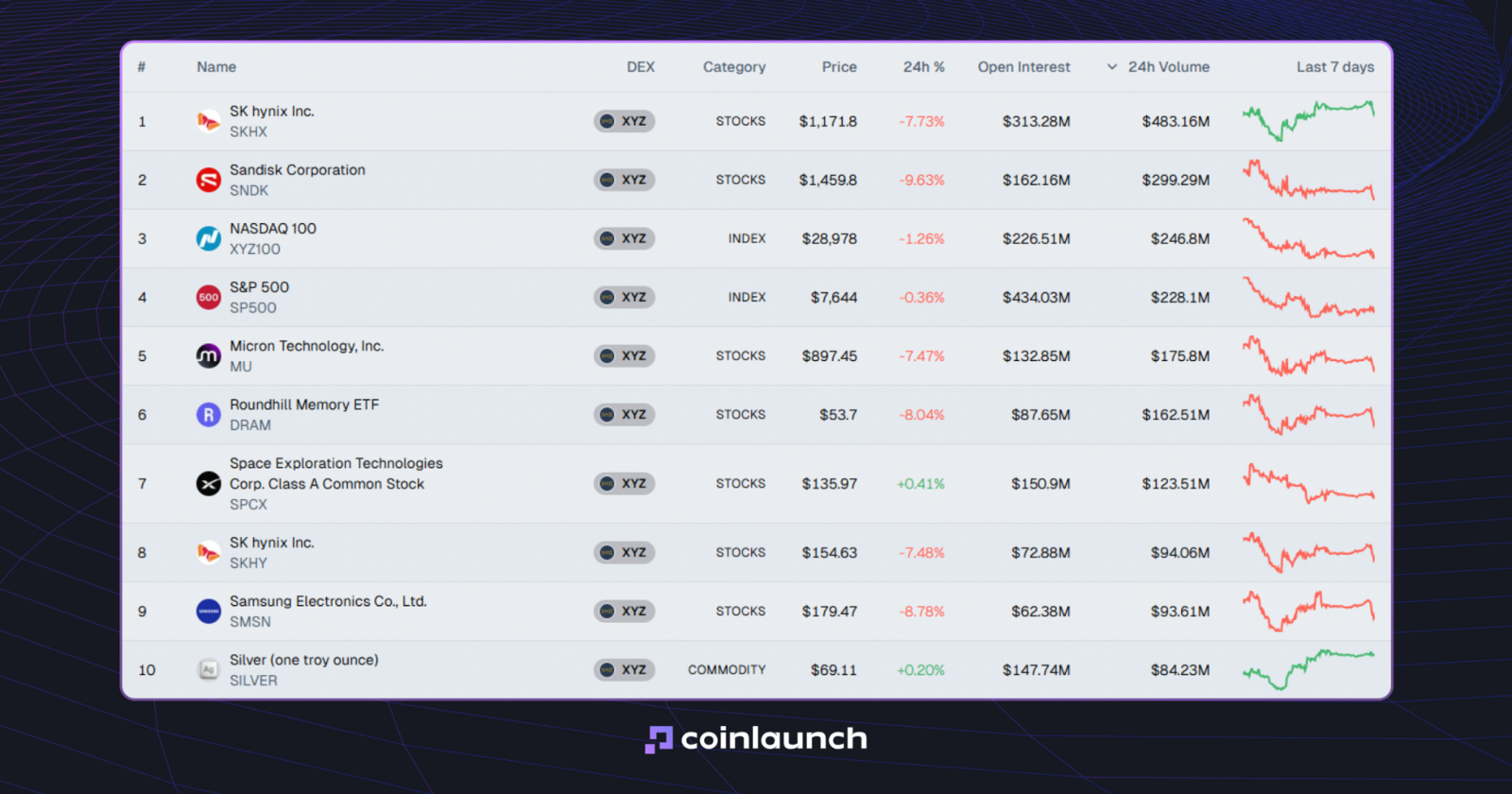
Gracias a esto, los mercados HIP-3 abarcan mucho más que las criptomonedas convencionales. Plataformas como TradeXYZ ofrecen contratos perpetuos vinculados a activos financieros tradicionales: acciones, índices, oro, plata y divisas (Forex). Conviene tener presente que las acciones y perpetuos sobre renta variable en Hyperliquid no otorgan la propiedad de las acciones subyacentes, sino que permiten posicionarse sobre la fluctuación del precio mediante derivados.
Los 10 principales mercados HIP-3 por volumen de negociación en 24 horas. Fuente: oakresearch.io
A través de goodcryptoX, estos mercados están disponibles en la misma interfaz que los perpetuos habituales de Hyperliquid. Puedes aplicar órdenes Trailing Stop, Take Profits multiobjetivo, bots Grid y DCA, y automatizaciones de TradingView sobre activos HIP-3. goodcryptoX ofrece soporte nativo para los proveedores de HIP-3, como TradeXYZ.
Pasos para operar en mercados HIP-3:
Conecta tu cuenta de Hyperliquid a goodcryptoX.
Abre el selector de pares.
Utiliza el buscador para localizar el activo deseado (acciones, materias primas o pares de divisas).
Selecciona Buy o Sell, ajusta el apalancamiento, introduce el tamaño y elige el tipo de orden.
Añade niveles de TP/SL, configura un Trailing Stop o activa un bot Grid o DCA según tu estrategia.
Envía la orden y monitoriza la posición en las pestañas Orders o Positions.
Una vez que conoces cómo operar con acciones en Hyperliquid mediante goodcryptoX, el funcionamiento es idéntico al de cualquier perpetuo cripto: cambia el activo subyacente, pero la ejecución de órdenes y la gestión de la posición son exactamente las mismas.
Plataforma de trading Hyperliquid: app nativa frente a goodcryptoX
Al comparar la plataforma de trading Hyperliquid con goodcryptoX como interfaces operativas, las diferencias sustanciales surgen más allá de las órdenes Market y Limit estándar. La plataforma nativa de Hyperliquid proporciona acceso directo al mercado y a la ejecución de órdenes, mientras que goodcryptoX añade capacidades móviles para iOS, tipos de órdenes avanzadas y herramientas de automatización que no están presentes en el terminal nativo.
Parámetro
Hyperliquid nativo
goodcryptoX
Órdenes básicas Market y Limit
✅
✅
Trailing Stop
Funcionalidad nativa limitada
✅ Trailing Buy/Sell con Trailing Start
Take Profit múltiple
TP/SL básico
✅ Múltiples objetivos de TP para una sola posición
Stop Loss con Auto-Follow
❌
✅ El SL se desplaza automáticamente tras ejecutarse un TP
Bots Grid y DCA
❌
✅ Bots Grid y DCA sin necesidad de código + bot de señales/TradingView mediante webhooks
Automatización con TradingView
❌
✅ Activadores por webhook para órdenes y bots
Aplicación móvil
Android; sin app nativa independiente para iOS
✅ iOS y Android
Mercados HIP-3
✅
✅
Múltiples exchanges y carteras
❌
✅ Interfaz y cartera unificadas
Comisiones de la interfaz
Únicamente comisiones nativas de Hyperliquid
Comisiones de Hyperliquid + comisión del desarrollador (builder fee)
Regiones restringidas
Estados Unidos, Ontario (Canadá) y jurisdicciones sancionadas
Sin lista fija
Múltiples cuentas de Hyperliquid
Carteras/cuentas gestionadas por separado
✅ Opera y monitoriza múltiples cuentas conectadas desde una sola interfaz
Conclusión: cómo empezar a operar en Hyperliquid
Para resumir cómo empezar a operar en Hyperliquid, el proceso se basa en unos sencillos pasos: conecta un monedero o inicia sesión con tu correo electrónico, deposita USD Coin (USDC), selecciona un mercado al contado o de perpetuos, ajusta el apalancamiento y el modo de margen, y lanza una orden Market, Limit u otra admitida. Una vez abierta la posición, contrólala mediante parámetros de Take Profit y Stop Loss (TP/SL), opciones Reduce Only y las herramientas nativas de la plataforma.
Aquellos operadores que deseen sacar el máximo provecho de Hyperliquid pueden utilizar goodcryptoX como alternativa. Este terminal ofrece aplicaciones móviles dedicadas para iOS y Android, órdenes Trailing Stop, Take Profits multinivel, función Stop Loss con Auto-Follow, bots Grid y DCA, y webhooks de TradingView. Basado en una arquitectura de monedero API no custodial, goodcryptoX ejecuta y administra órdenes sin acceso a retiradas de fondos.