Coinlaunch was created by a team of crypto experts to help current and future crypto investors find the latest cryptocurrency ICOs and presales. All content follows a strict editorial policy that ensures factual accuracy, neutrality, and usefulness. We strive to provide insightful content that helps our audience make informed decisions, while emphasizing the importance of prioritizing safety and risk management. All information in our content is based on thorough research conducted by our team of copywriters and editors. We use proven sources to find relevant projects and ensure that all content is updated regularly. The information provided by Coinlaunch should be used for informational purposes only and should not be taken as investment advice.
Table of Contents
What Is Hyperliquid Crypto Exchange and How Does Hyperliquid Work
How to Use Hyperliquid: Step-by-Step Trading Guide
Hyperliquid Connect Wallet: Create or Connect Your Account
Hyperliquid Deposit: How to Deposit Funds
Hyperliquid Perpetuals: Choose a Market and Set Up Your Trade
Hyperliquid Order Types: Place and Manage Your Order
Hyperliquid App: How to Trade Hyperliquid on Mobile
goodcryptoX Hyperliquid Support: How to Use Hyperliquid on Mobile
goodcryptoX Hyperliquid: How to Trade With goodcryptoX
Hyperliquid Advanced Order Types With goodcryptoX
Hyperliquid Trading Bot: Trading Bots on goodcryptoX
Hyperliquid HIP-3: How to Trade HIP-3 Markets via goodcryptoX
Hyperliquid Trading Platform: Native App vs goodcryptoX
Conclusion: How to Start Trading on Hyperliquid
Share this blog post
Hyperliquid is leading the perpetual decentralized exchange sector by volume: as of August 24, Hyperliquid trading volume sits at around $6.9 billion over 24 hours and $207 billion over the last 30 days. The fully on-chain, noncustodial platform offers over 300 spot and perpetual markets, including HIP-3 listings spanning cryptocurrencies, stocks, indices, commodities, and other assets.
Despite its popularity, the exchange remains tricky to use.
So, this Hyperliquid trading guide walks through the full process step by step, from connecting an account and making a deposit to opening and managing a position. It covers how to trade on Hyperliquid through the native interface and how to trade on Hyperliquid through goodcryptoX using its mobile app, advanced order types, and trading bots.
The final sections explain how to trade Hyperliquid through HIP-3 markets, how trading fees work, and how the native Hyperliquid interface compares with goodcryptoX. This is aimed at traders looking beyond basic Hyperliquid trading and those who want to understand how to use Hyperliquid DEX with additional automation tools.
What Is Hyperliquid Crypto Exchange and How Does Hyperliquid Work
Hyperliquid is a Layer 1 blockchain for on-chain trading, with spot and perpetual markets built into the network. For anyone searching what is Hyperliquid crypto exchange, calling it simply a DEX misses part of the picture. Its trading layer runs through HyperCore, a system with fully on-chain order books, a matching engine, and margin logic. Every order, cancellation, trade, and liquidation is processed inside HyperCore.
A practical answer to how does Hyperliquid work starts with its order book. The mechanics are similar to those of centralized exchanges: users place buy and sell orders, and the system matches them based on price and time priority. The order book itself remains on-chain rather than being stored on an exchange server. Hyperliquid also runs HyperEVM, an Ethereum Virtual Machine (EVM)-compatible environment for smart contracts.
To understand what is Hyperliquid trading, it helps to look at the platform’s core trading features. Users can buy assets on spot markets or open long and short positions through perpetual contracts. Perpetuals have no expiration date and use funding payments, with cross and isolated margin available for positions. Most perpetual contracts use USDC as collateral.
How to Use Hyperliquid: Step-by-Step Trading Guide
Skipping the theoretical background on how to use Hyperliquid in practice, the mechanics are straightforward: connect your account, deposit funds, pick a market, configure trade parameters, and submit your order. For perpetual positions, this involves selecting leverage and margin type, followed by managing stop-loss, take-profit, and order closure once the position is live.
The process is broken down below so you can learn how to trade on Hyperliquid step by step, covering everything from your initial wallet connection and deposit to order execution and management.
Hyperliquid Connect Wallet: Create or Connect Your Account
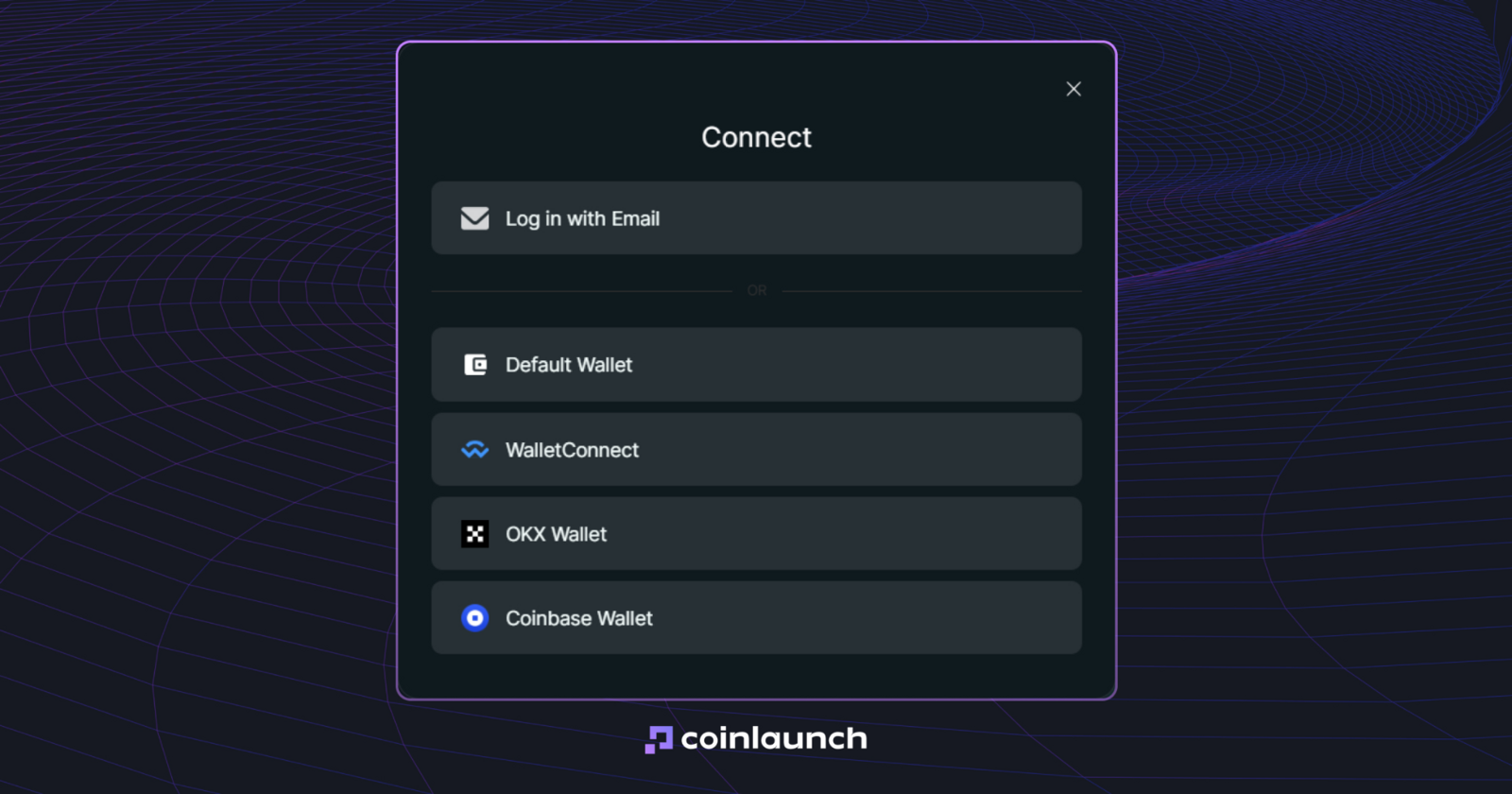
You can start in one of two ways: connect an existing decentralized finance (DeFi) wallet or log in using an email address. Hyperliquid supports almost every Ethereum Virtual Machine (EVM) wallets, including MetaMask, Rabby, Coinbase Wallet, and WalletConnect. If you log in via email, the platform generates a blockchain address managed directly through your account.
Select your wallet and confirm the connection in its interface.
Click Enable Trading.
Sign the gasless transaction to finish setting up your account for deposits and trading.
If you are from a restricted region, you might need a VPN to access the platform.
If you want to know how to connect to Hyperliquid without an external wallet, select the email login option. Hyperliquid sends a six-digit verification code, and entering it automatically creates a new wallet address for your account.
Hyperliquid Deposit: How to Deposit Funds
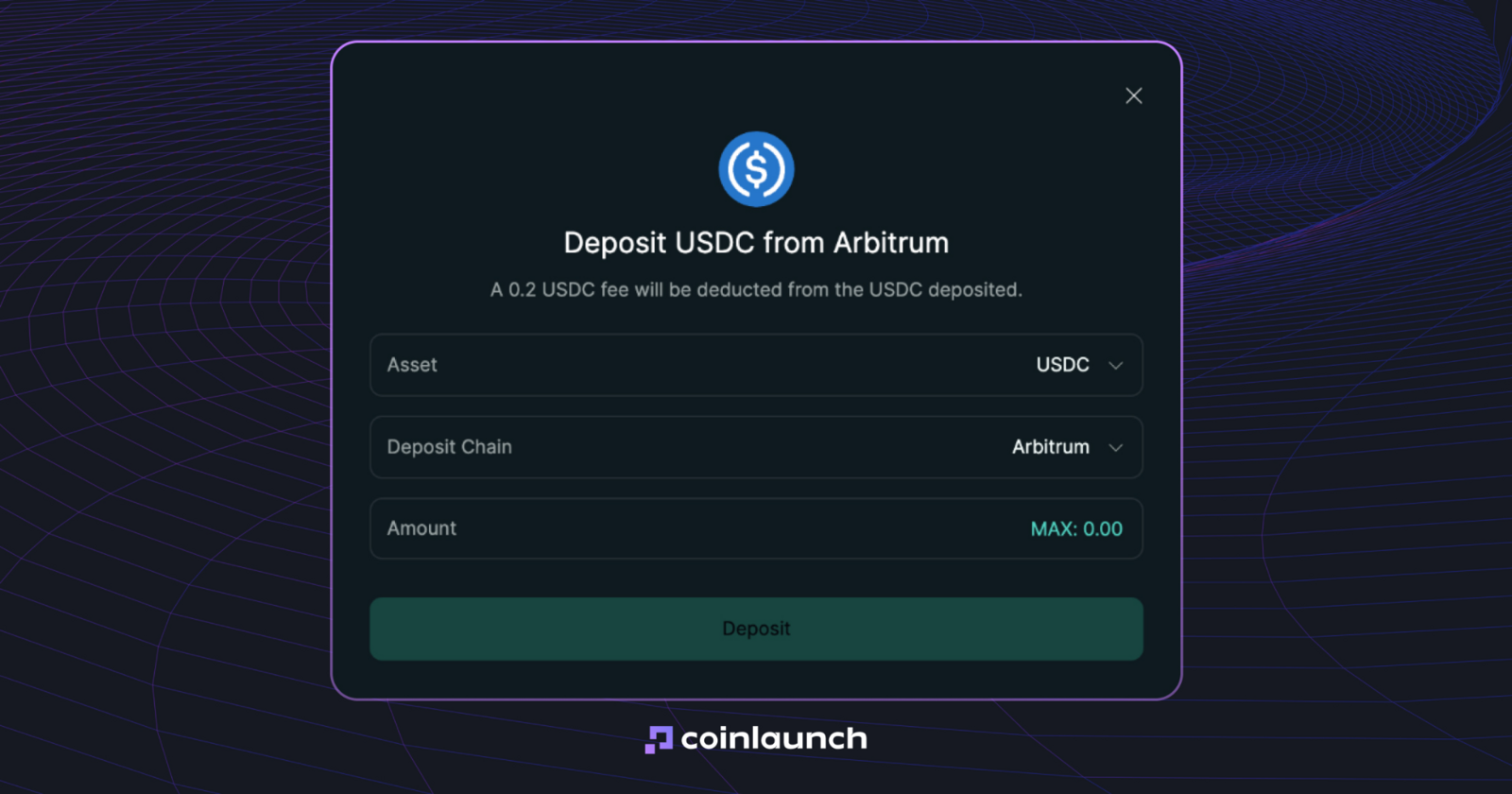
Standard funding for a Hyperliquid deposit relies on USD Coin (USDC) on the Arbitrum network. You will need USDC alongside a small amount of Ether (ETH) to cover gas fees for the outgoing transaction. If your assets sit on another network, move them to Arbitrum via a bridge or withdraw them directly from a centralized exchange.
Here is how to deposit on Hyperliquid:
Transfer USDC and a small amount of ETH to the Arbitrum network.
Head to the Hyperliquid trading interface and click Deposit.
Enter your desired USDC amount and confirm the transaction in your connected wallet.
Wait for confirmation, after which the USDC credits to Hyperliquid, typically in under a minute.
Before learning how to deposit funds on Hyperliquid, verify the Hyperliquid minimum deposit. The floor is currently 5 USDC. Sending a smaller amount, like 4 USDC, results in lost funds. Email-based accounts are the sole exception: you can send an additional USDC transfer to meet the threshold, which credits the full combined amount.
To sum up, learning how to fund Hyperliquid account comes down to a clear sequence: prepare USDC on Arbitrum and send at least 5 USDC via Deposit. Once credited, use the funds as collateral for perpetual positions or transfer them between Spot and Perps balances.
The same logic applies when figuring out how to withdraw from Hyperliquid. Click Withdraw, enter the USDC amount, and select Withdraw to Arbitrum. Executing a Hyperliquid withdrawal requires no separate gas transaction on your end, network validators process the exit while the protocol deducts a flat $1 fee. Funds generally arrive in your wallet within a few minutes.
Hyperliquid Perpetuals: Choose a Market and Set Up Your Trade
The flagship trading product on the platform is Hyperliquid perpetuals, which are perpetual derivatives with no expiration date. Their price tracks the underlying asset via a funding mechanism, with payments exchanged between long and short positions every hour. As a result, references to Hyperliquid futures trading on the platform generally describe these perpetual contracts rather than traditional futures with fixed settlement dates.
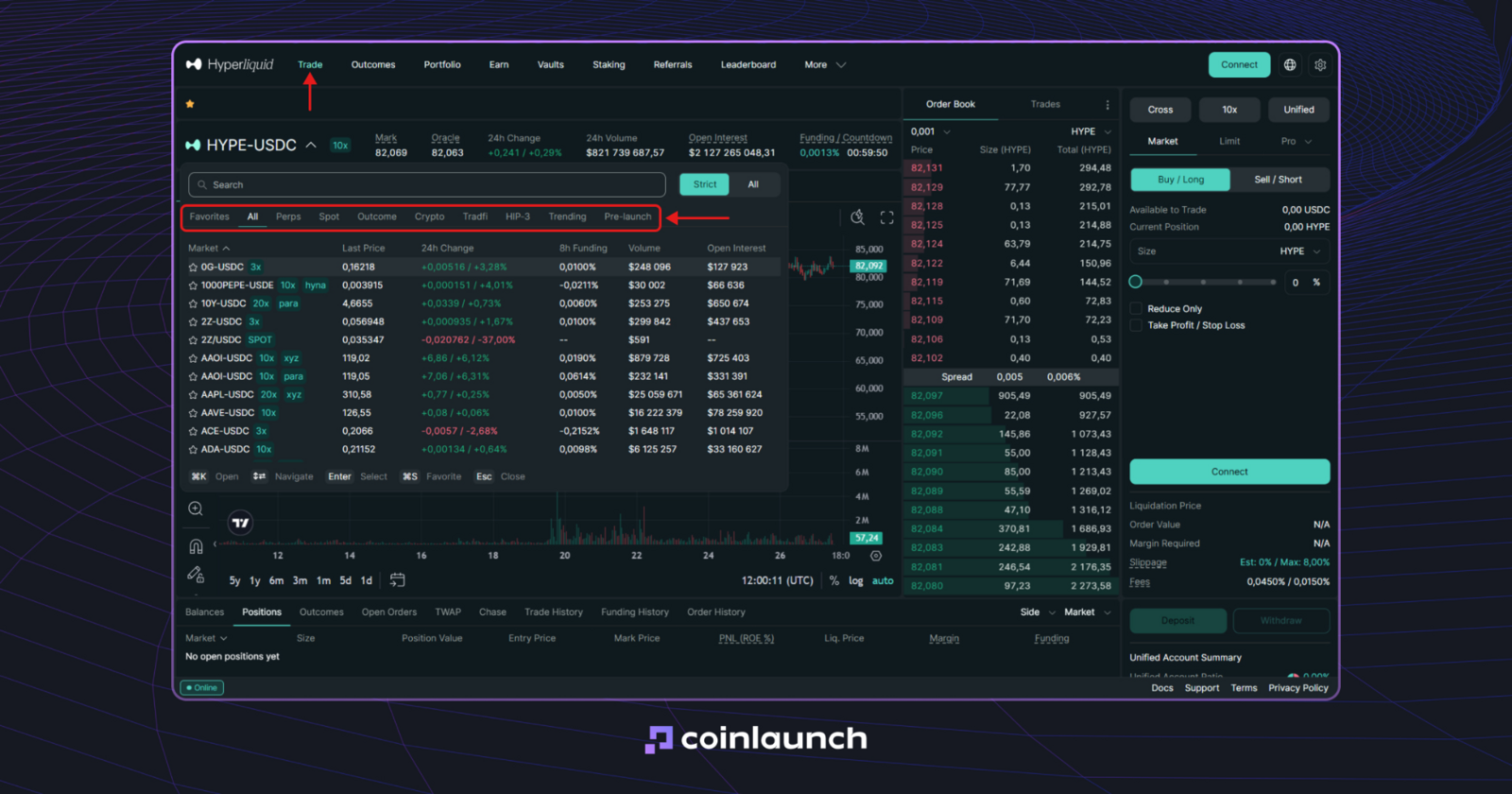
Perps and other Hyperliquid markets. Source: Hyperliquid.xyz
To start Hyperliquid perp trading, select your desired market at the top of the terminal, set your position side to Long or Short, and specify the trade size. Maximum leverage varies by asset, allowing you to choose an integer value from 1x up to the market cap limit.
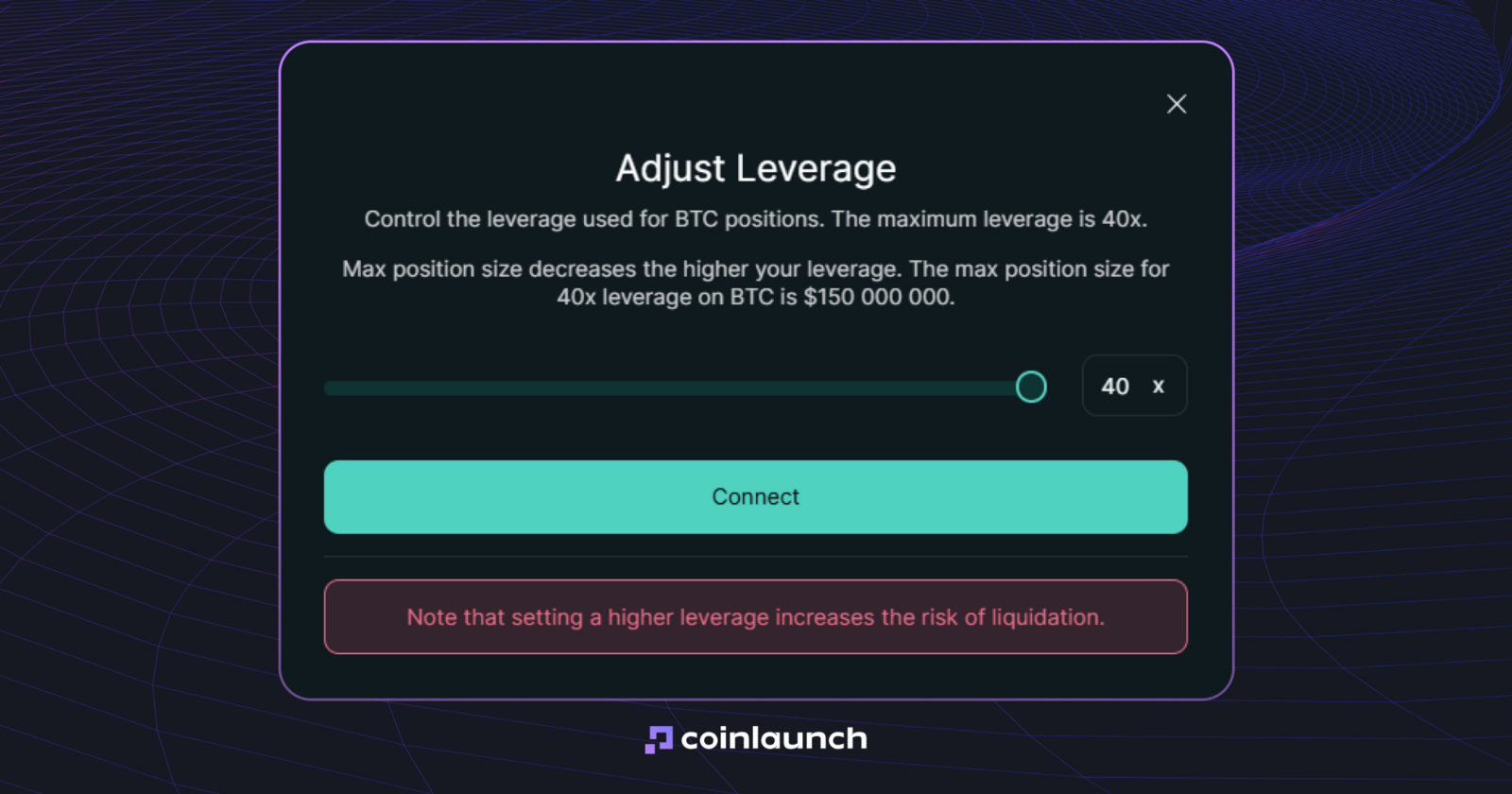
Example of a 40x leverage limit for the BTC/USDC trading pair. Source: Hyperliquid.xyz
You must also pick a margin mode before submitting an order. Selecting Hyperliquid cross margin pool collateral across all cross positions into a single account balance. With isolated margin, collateral is locked to a specific trade, ensuring a liquidation will not impact other isolated or cross positions. Certain assets only support isolated mode.
When asking "does Hyperliquid support spot trading?", the answer is yes. Switch from Perpetuals to Spot in the market selector to choose an available trading pair. Spot trading operates without leverage or funding rates, as users buy or sell the underlying asset directly rather than opening derivative positions.
Hyperliquid Order Types: Place and Manage Your Order
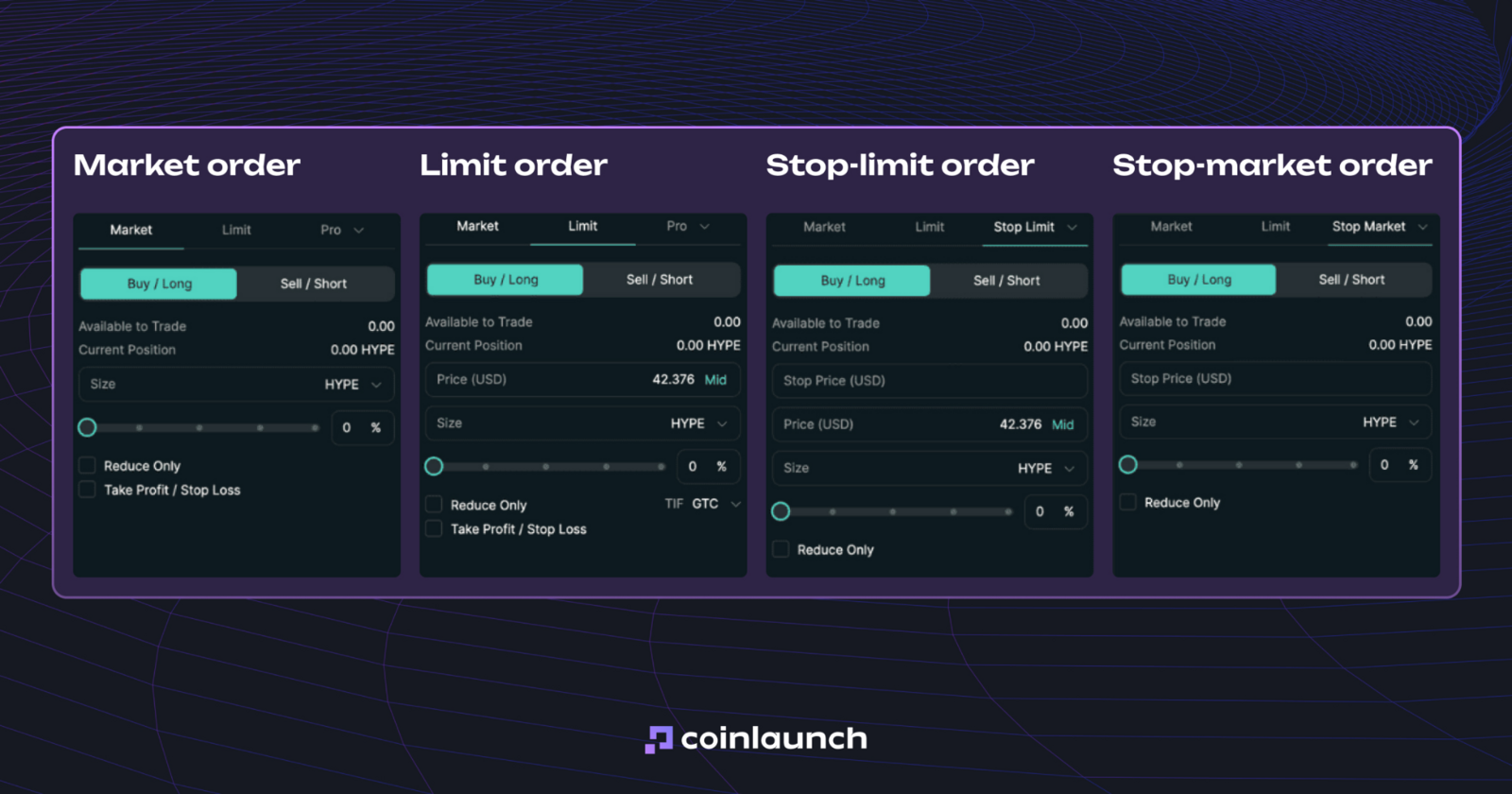
The list of available Hyperliquid order types includes Market, Limit, Stop Market, Stop Limit, Take Market, Take Limit, Scale, and TWAP. Market orders execute immediately at the current market price, whereas Limit orders execute only at a specified price or better. Conditional entries and exits rely on Stop and Take orders. Scale orders spread multiple limit orders across a designated price range, while TWAP breaks a large order into smaller portions, sending them at 30-second intervals.
When submitting a Hyperliquid limit order, you can select GTC (Good ’Til Canceled), ALO (Add Liquidity Only), or IOC (Immediate or Cancel) execution parameters. GTC remains in the order book until filled or canceled, ALO functions strictly as a maker order, and IOC fills available liquidity immediately while canceling any remaining balance. You can also manage open positions using Reduce Only, Take Profit, and Stop Loss settings.
Hyperliquid App: How to Trade Hyperliquid on Mobile
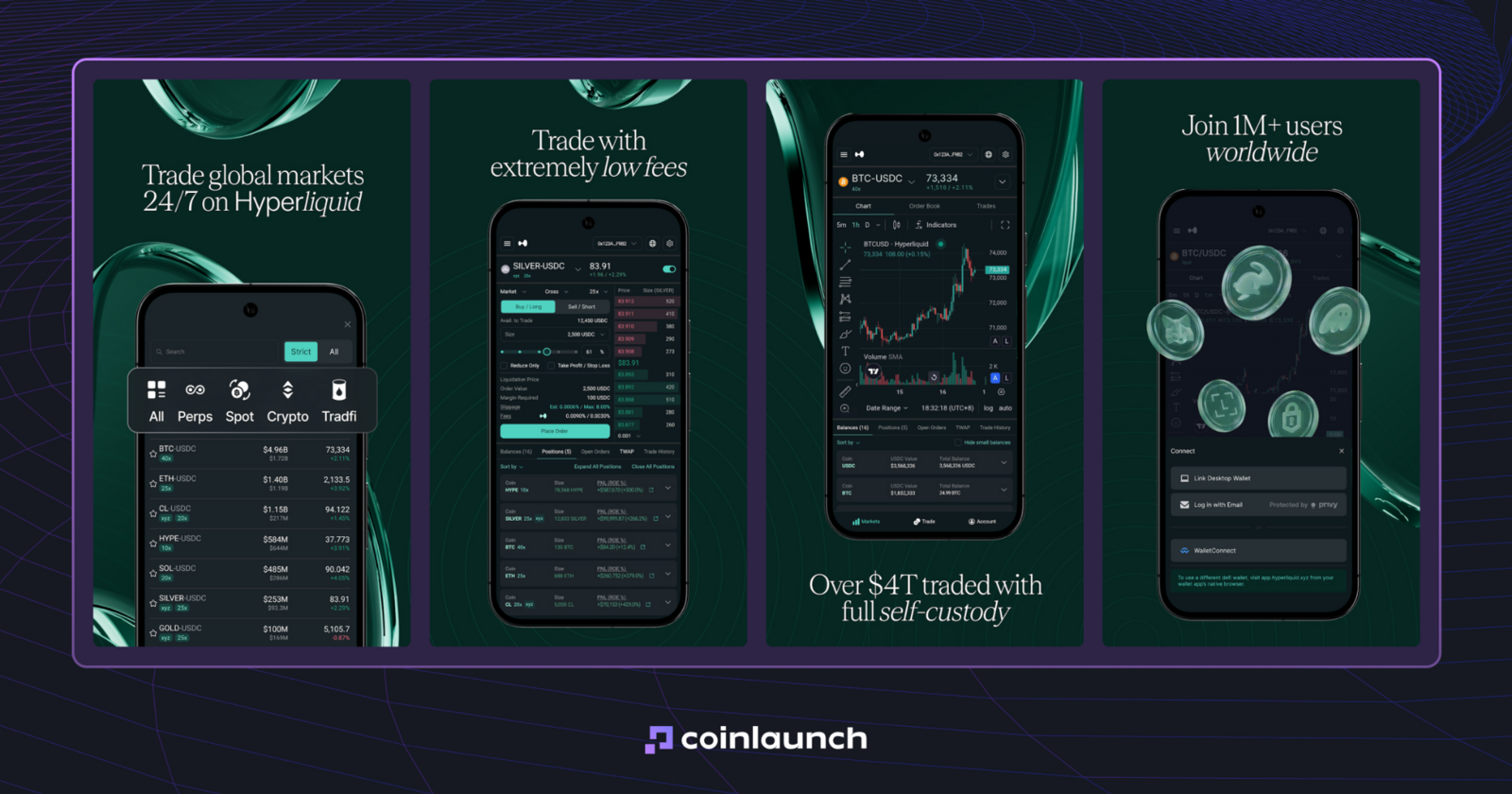
In 2026, the answer to "does Hyperliquid have a mobile app" depends on your operating system. The official Hyperliquid app is currently available on Android: the application by Hyperliquid Corp is listed on Google Play, supporting perpetuals, spot trading, deposits and withdrawals, TWAP, TP/SL orders, portfolio margin, and position tracking.
The team originally launched the Hyperliquid mobile app as a stripped-back MVP with push notifications for trades, but the current version offers a full-fledged trading interface.
Hyperliquid mobile app interface on Android. Source: play.google.com
The situation is different on the iPhone. There is no official Hyperliquid iOS app in the App Store right now, making the Hyperliquid official mobile app exclusive to Android users.
iOS users are left with the Hyperliquid mobile web version, which is less than ideal for active trading. To trade through a dedicated application on iOS, you can use Hyperliquid with mobile app trading, such as goodcryptoX instead. Its iOS and Android apps offer the same functionality as the web terminal, including advanced orders, no-code trading bots (Grid, DCA, Signals), and management of your connected Hyperliquid account.
goodcryptoX Hyperliquid Support: How to Use Hyperliquid on Mobile
Integration of goodcryptoX Hyperliquid support uses the same non-custodial application programming interface (API) wallet as the web terminal. If Hyperliquid is already connected to your goodcryptoX account, logging into the mobile app syncs the connection alongside exchange profiles, trading bots, and portfolio settings.
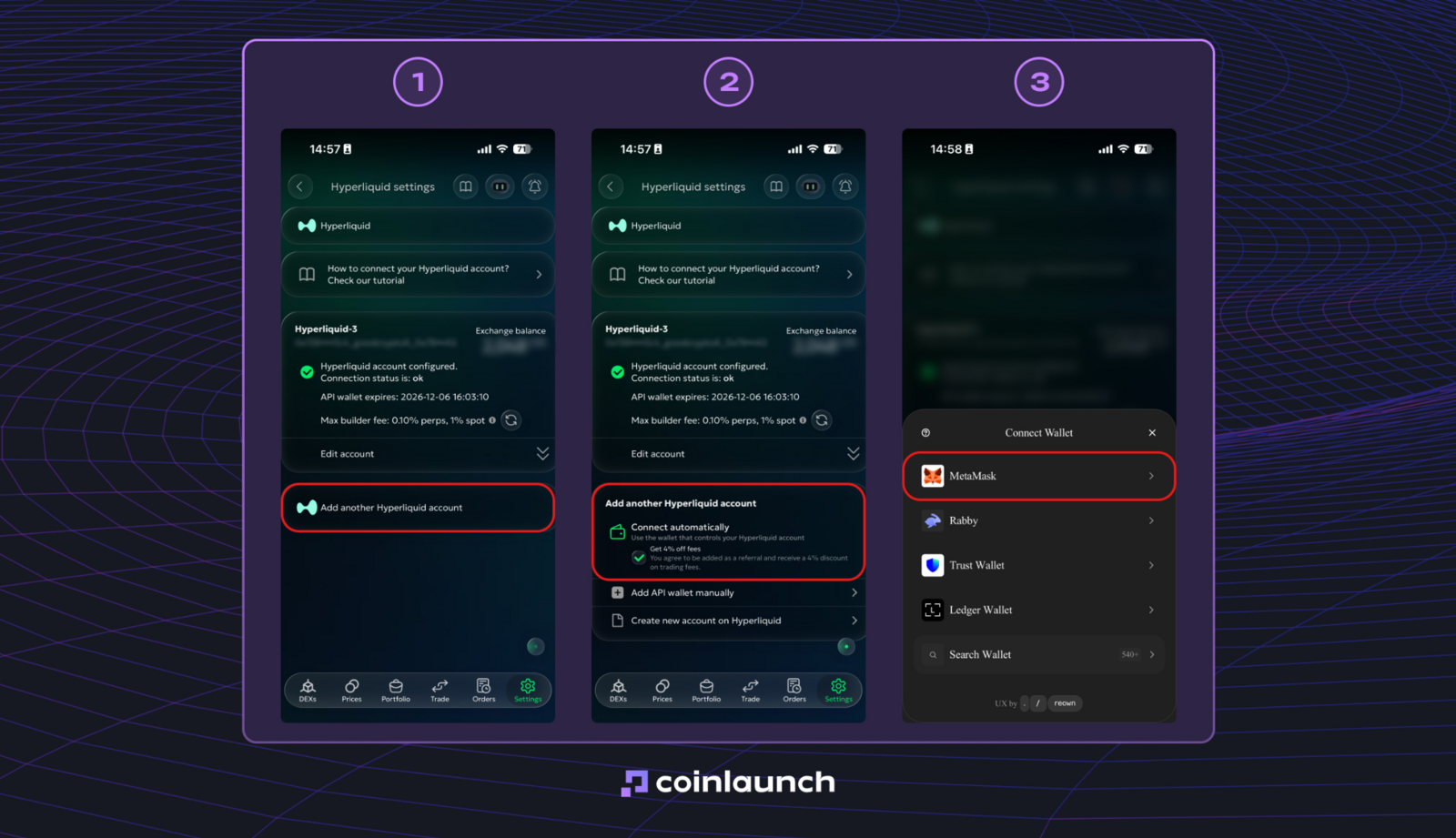
If you haven't linked the accounts yet, set up the connection by heading to Settings > Exchanges > Hyperliquid. MetaMask supports automated setup, whereas other wallets require a manual API wallet import.
Hyperliquid connection interface in goodcryptoX. Source: goodcrypto.app
Once connected, the API wallet is saved in goodcryptoX, so you do not need to reconnect the controlling wallet every time you trade. You can also connect multiple Hyperliquid accounts, switch between them from the same interface, and track their balances, positions, and performance alongside the rest of your portfolio.
When figuring out how to use Hyperliquid on mobile, goodcryptoX provides a direct workaround. The platform delivers the full suit of desktop tools across iOS and Android: manage open positions, configure advanced orders, track portfolios, and run Grid or Dollar-Cost Averaging (DCA) bots straight from a smartphone.
Unlike native Hyperliquid options, goodcryptoX delivers complete app-based trading functionality on iOS, filling the gap left by the lack of an official iPhone app.
goodcryptoX Hyperliquid: How to Trade With goodcryptoX
The goodcryptoX Hyperliquid integration is aimed at traders who want to get more out of Hyperliquid without giving up its non-custodial model. The goodcryptoX terminal secures order-placement permissions without gaining withdrawal access. Trade execution remains on Hyperliquid, while the terminal adds CEX-grade trading tools on top of the exchange.
The setup works for both newer traders and more experienced users. The interface keeps complex tools accessible without requiring code, while active traders get more control over entries, exits, and automation.
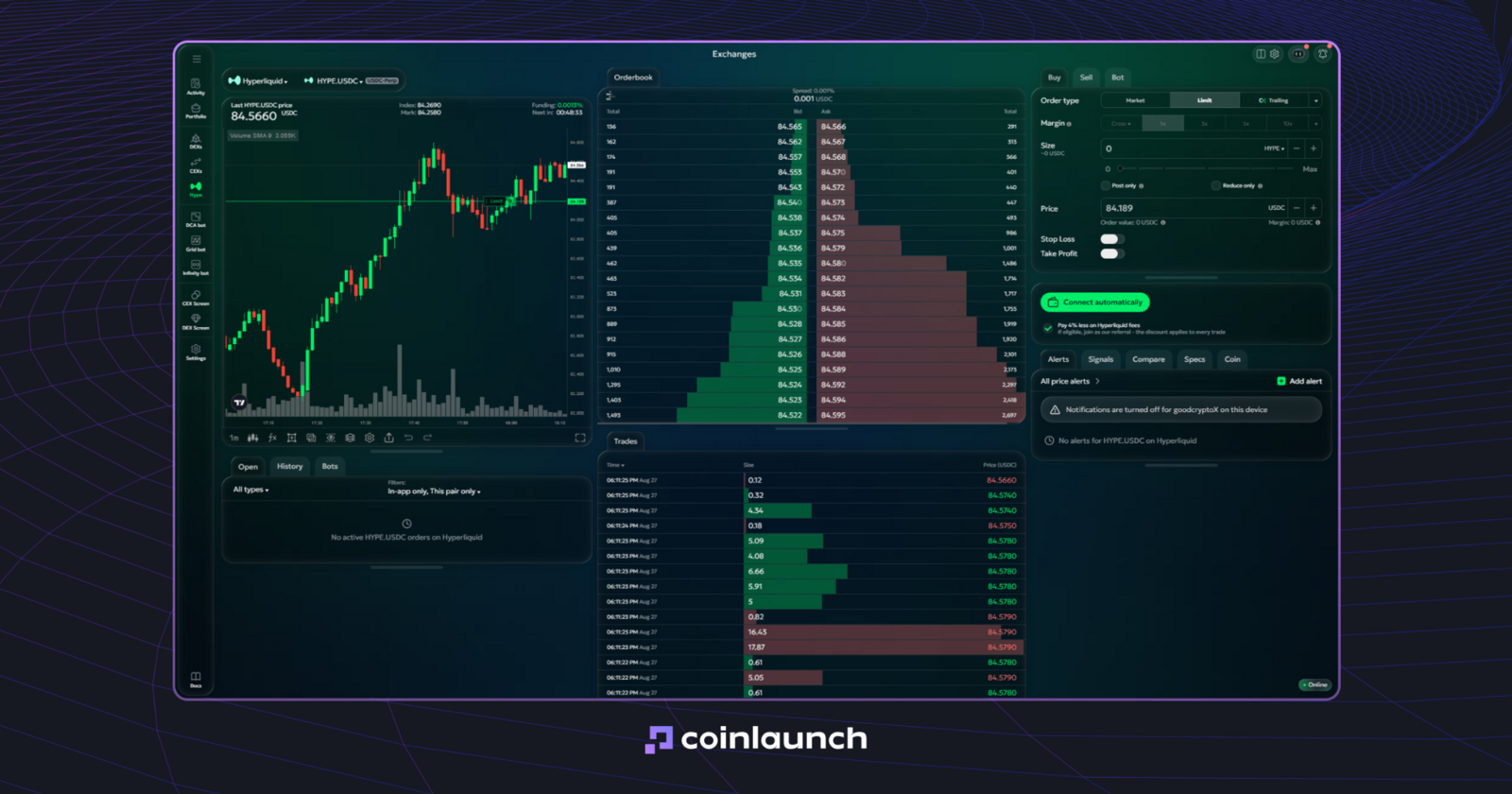
Trading Hyperliquid through goodcryptoX brings major advantages in automation and position management. The platform offers Grid and DCA Bots, Trailing Stop orders, multi-level Take Profit setups, Stop Loss triggers that automatically adjust after a Take Profit fills, and order or bot execution via TradingView webhooks. These features carry over to the iOS and Android mobile apps, granting full control over your Hyperliquid account directly from a phone.
goodcryptoX trading terminal using HYPE/USDC as an example. Source: goodcrypto.app
Hyperliquid provides market access and order execution, while goodcryptoX introduces complex order types, no-code automation, mobile account management, and a unified portfolio alongside other exchanges and wallets.
Hyperliquid Advanced Order Types With goodcryptoX
The Hyperliquid advanced order types on goodcryptoX bring CEX-grade position management tools to Hyperliquid without moving trading to a custodial exchange. They expand standard Market and Limit orders by adding trailing mechanics, multi-target Take Profits, auto-adjusting Stop Losses, and webhook triggers.
These Hyperliquid trading tools run directly on top of your linked Hyperliquid account, sitting in the same execution window where you set Buy/Sell options, margin modes, leverage, and order size.
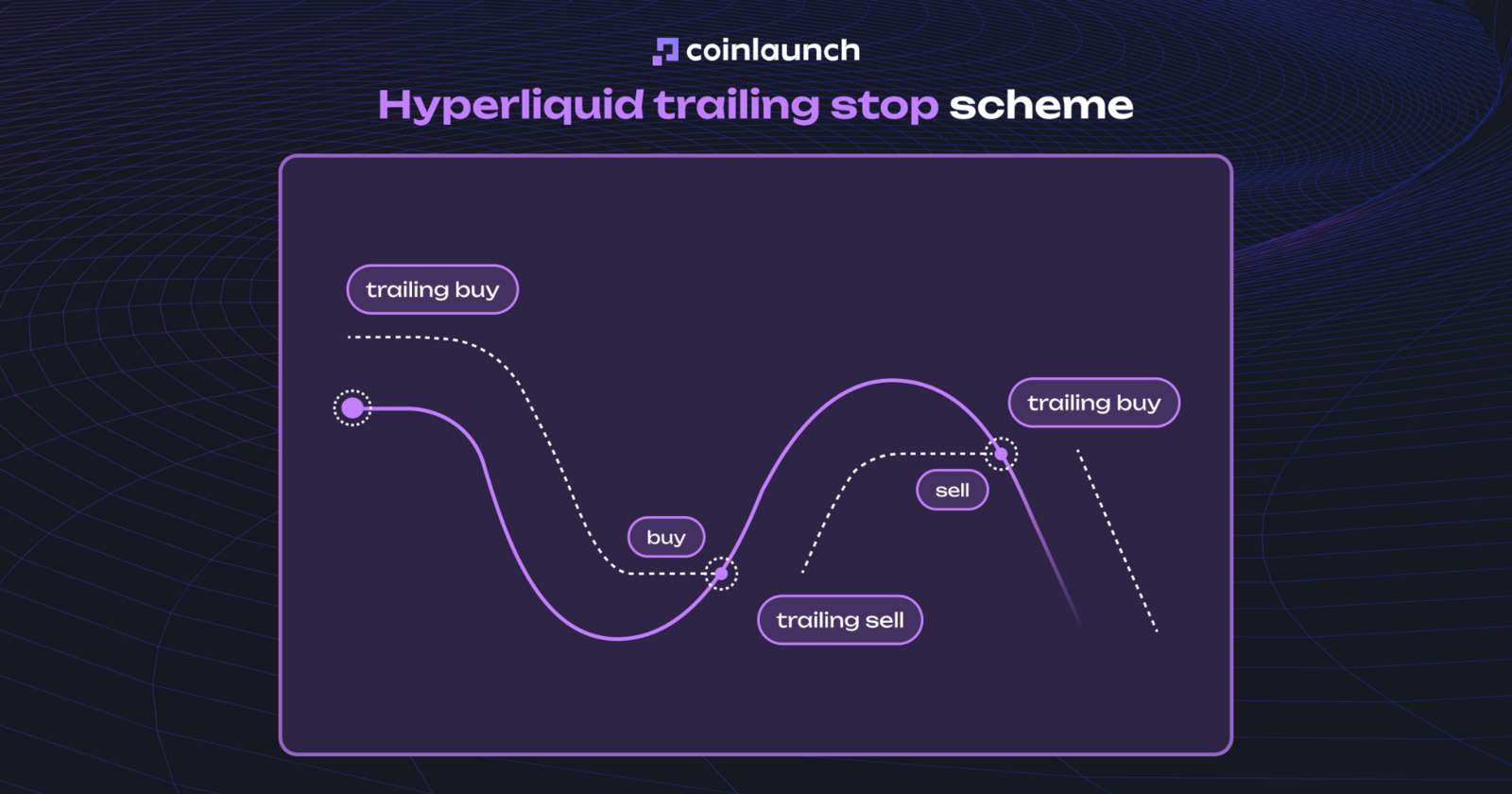
Hyperliquid Trailing Stop. Unlike a standard stop order, the Hyperliquid Trailing Stop tracks market prices dynamically. The trigger point follows price movements at a set distance: for Buy orders, it steps down alongside drop-offs and triggers when price rebounds upward; for Sell orders, it rises with the market and triggers on pullbacks. This mechanism lets you use a Hyperliquid Trailing Stop order for both market entries and position exits.
Select Hyperliquid and your target trading pair in the Trade terminal.
Open the Buy or Sell tab.
Pick Trailing in the Order type dropdown.
Enter your desired Size and Trailing Distance.
Enable Trailing Start if needed, which delays price tracking until the market reaches a target price or receives a TradingView webhook.
Click Send to place the order in the Orders tab until execution or cancellation.
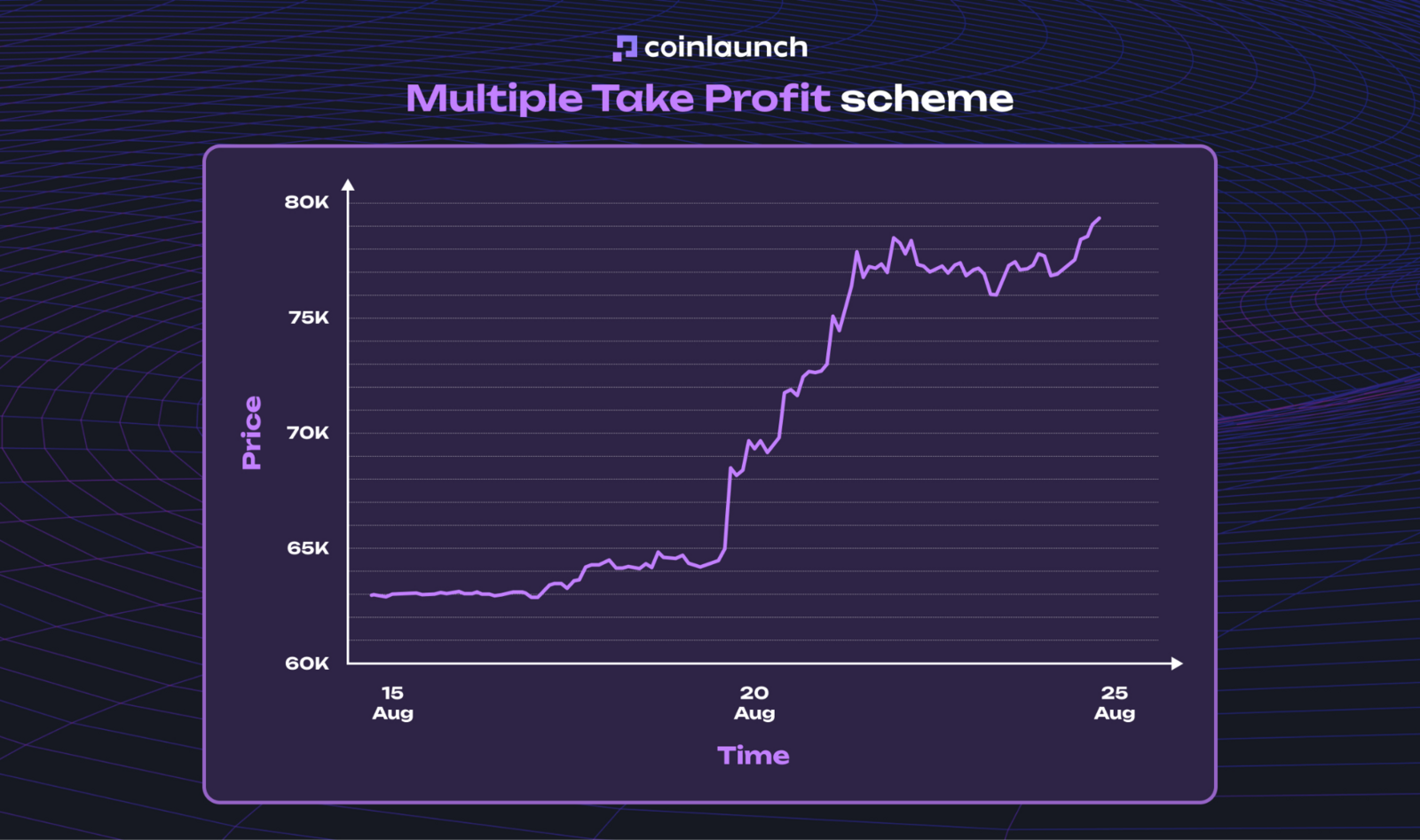
Multiple Take Profit and Auto-Follow Stop Loss. Exit strategies make up another key suite of Hyperliquid advanced trading tools. Rather than setting a single Take Profit, you can establish multiple target prices to exit a position incrementally. You can also link your Stop Loss directly to these TP levels, automatically recalculating and shifting the stop trigger higher or lower as each profit target hits.
You can set up these parameters directly within the order form:
Create a primary Market, Limit, or Trailing order.
Toggle the Stop Loss and Take Profit options to active.
Enter a target price or percentage offset from your entry price for the TP.
Click "+" to add additional TP targets and designate the position percentage to close at each level.
Set a trigger price or distance from entry for your Stop Loss.
Toggle Auto-Follow on if you want the SL to trail behind as each TP target triggers.
Click Send Order to finish setup.
Once the main order fills, goodcryptoX generates the linked SL and TP orders automatically.
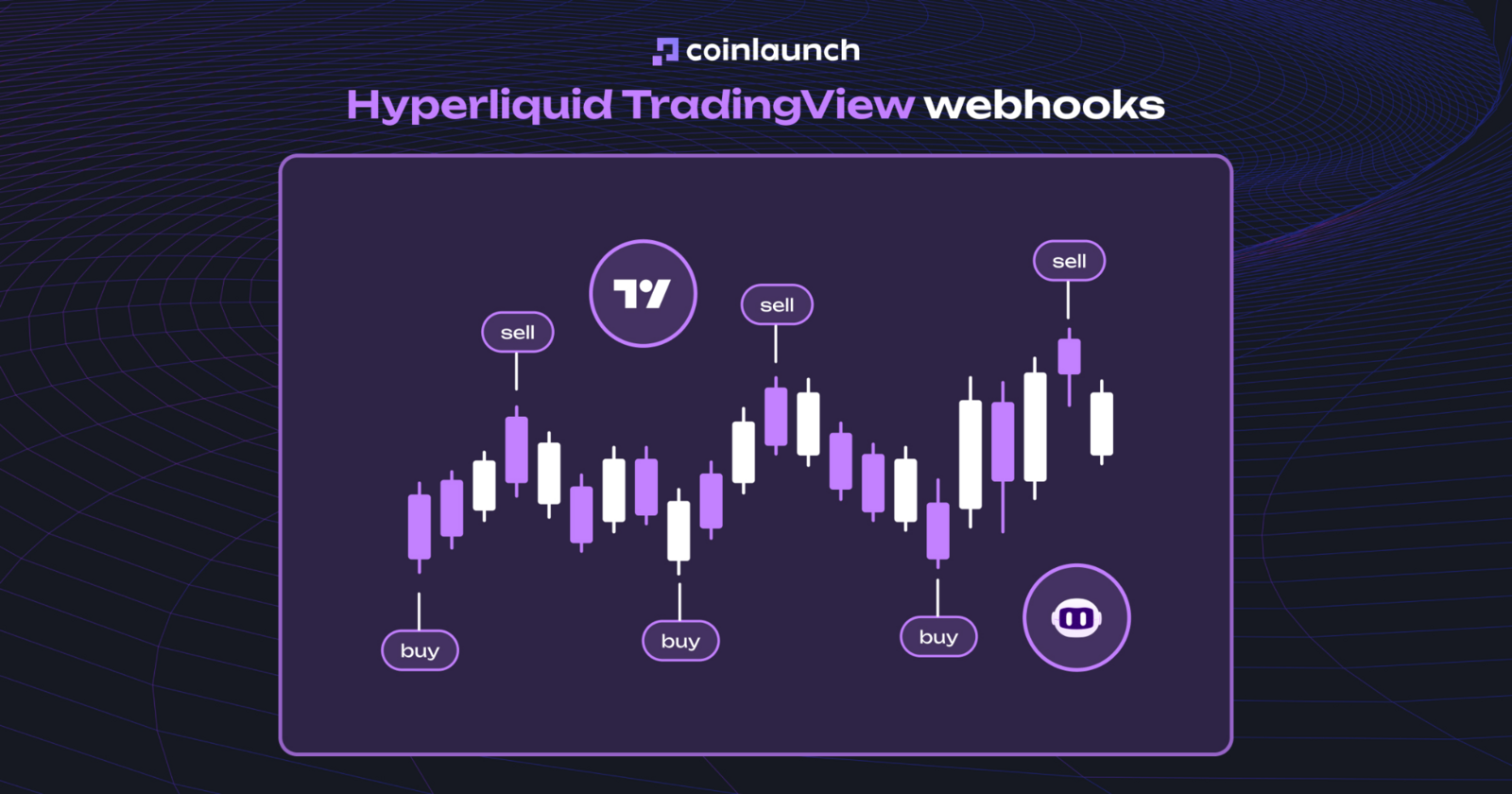
Webhook automation. External triggers on goodcryptoX can execute or cancel orders using signals from any application capable of sending a webhook, including TradingView, n8n, Zapier, AI agents, and other services. You can select Webhook as the Trigger Type instead of Price, prompting goodcryptoX to generate specific URLs for Trigger, Cancel, Stop Loss, and Take Profit actions.
TradingView is one way to configure this automation:
Set up an order and choose Webhook as the Trigger Type.
Open the order in the Orders tab.
Locate the Web hooks section under Order Details and copy the URL for your intended action.
Create an Alert in TradingView.
Enable Webhook URL under Notifications and paste the goodcryptoX address.
Save the alert.
Once the TradingView condition triggers, the request sent to that URL initiates the corresponding action in goodcryptoX.
Separately, Hyperliquid advanced order types TWAP function natively on the exchange, splitting large orders into a series of smaller executions over time. goodcryptoX expands these baseline Hyperliquid capabilities by adding trailing mechanics, multi-target Take Profits, Auto-Follow Stop Losses, and webhook automation.
Hyperliquid Trading Bot: Trading Bots on goodcryptoX
A Hyperliquid trading bot on goodcryptoX operates directly through your connected Hyperliquid account. The bot can place and adjust orders, but it never receives withdrawal permissions. Automation marks the biggest shift from Hyperliquid's native setup, allowing Hyperliquid trading bots to run continuously in the background without custom code, scripts, or personal servers.
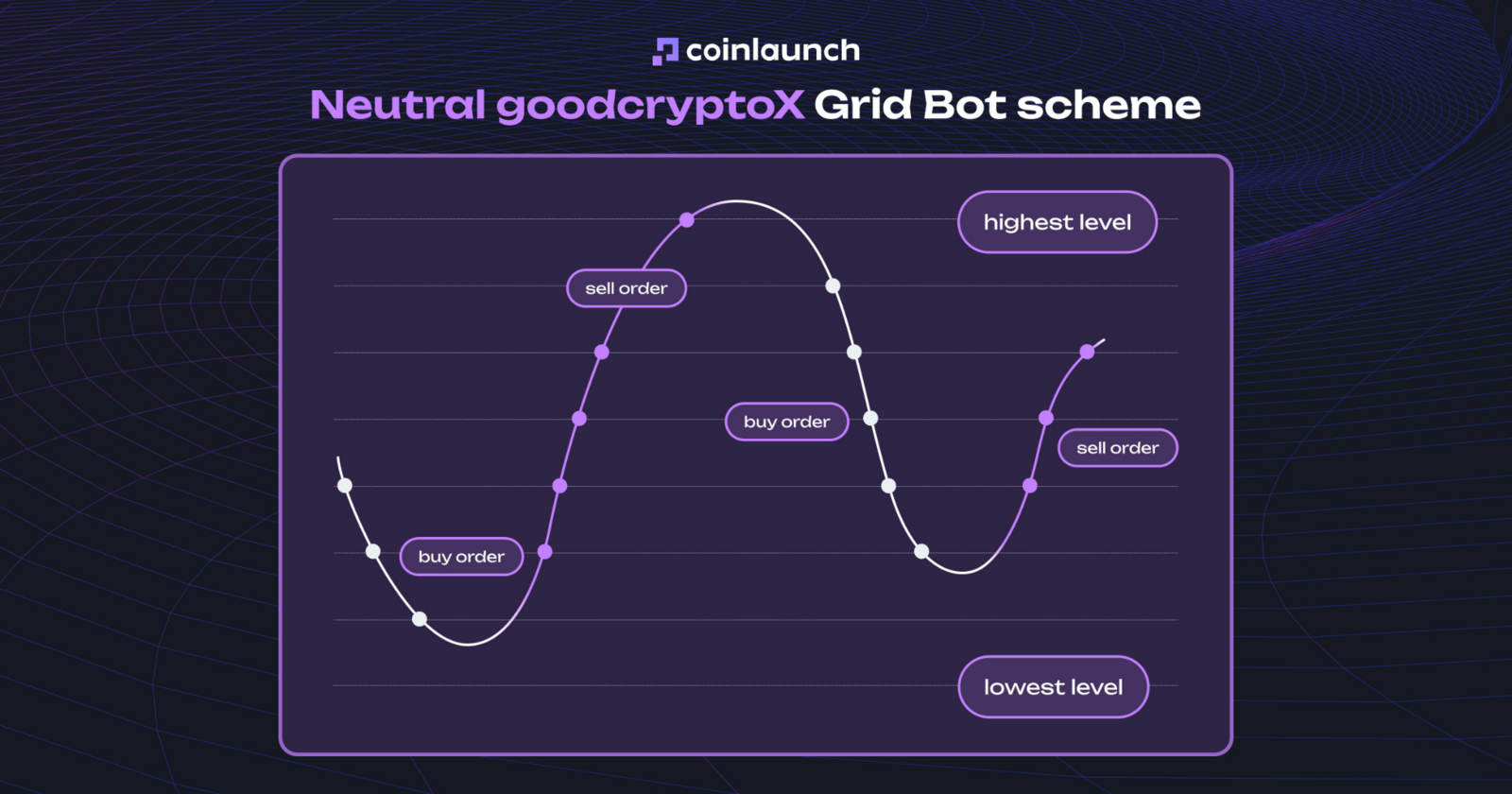
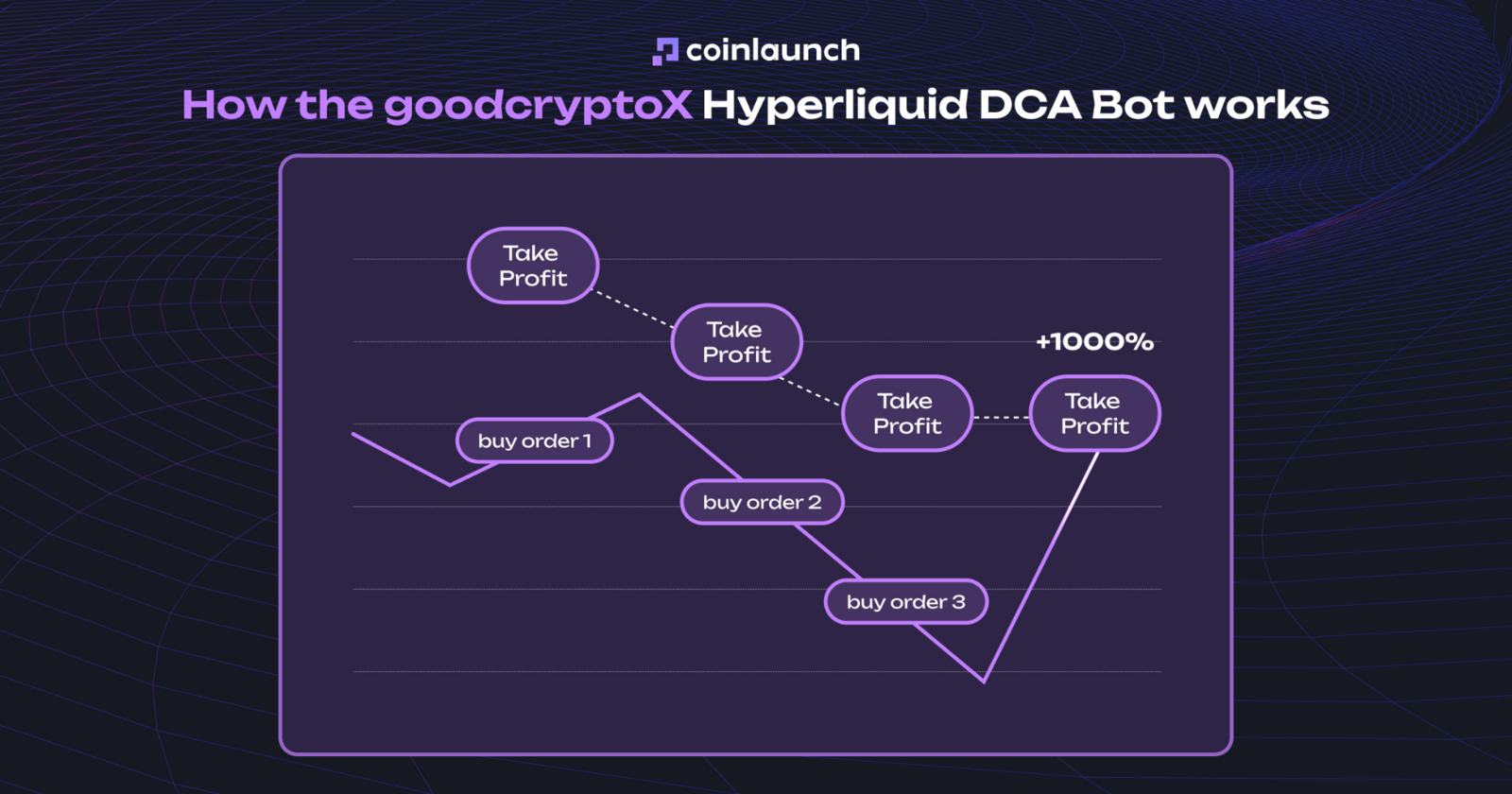
goodcryptoX provides two core automated strategies for Hyperliquid: a Hyperliquid Grid Bot and a Hyperliquid DCA Bot. Under Hyperliquid Grid trading, the system splits a target price range into distinct levels and places automated orders between them. A Hyperliquid DCA Bot adds safety orders when the market moves against a position, recalculating your average entry price and Take Profit targets along the way.
Grid Bot. The logic behind Hyperliquid Grid trading depends on your selected mode. Neutral Grid places buy orders below current market prices and sell orders above them. Long Grid opens a long position immediately, using lower price steps for dollar-cost averaging and upper steps for incremental exits. Short Grid mirrors this structure for short positions.
Select Hyperliquid and your target perpetual market.
Pick Neutral, Long, or Short Grid.
Set the Upper Price Limit and Lower Price Limit to define the bot's operating range.
Enter the number of Grid Levels, allowing goodcryptoX to space orders automatically.
Input your allocated capital and leverage settings.
Click Start Bot.
Once active, the Hyperliquid bot begins submitting orders within your specified boundaries. If the market price breaks outside this range, new Grid execution pauses automatically.
DCA Bot. The goodcryptoX Hyperliquid DCA Bot manages positions by pairing an initial order with subsequent safety orders. If price moves against your entry, executed safety orders adjust your average entry price, automatically recalculating your Take Profit target relative to the new average.
How the goodcryptoX Hyperliquid DCA Bot works. Source: goodcrypto.app
The setup offers both Partial Cost and Full Cost capital allocation modes. Partial Cost reserves margin exclusively for immediate safety orders rather than locking up funds for the entire order sequence upfront.
To set up a DCA Bot:
Select DCA Bot in the Bots tab.
Choose Hyperliquid and your target perpetual pair.
Select Partial Cost or Full Cost.
Set your initial order size, Safety Order Size, and number of safety steps.
Enter your Take Profit Distance.
Enable Stop Loss and set risk parameters if needed.
Input total capital allocation.
Click Start Bot.
The strategy includes native Hyperliquid TradingView integration. Webhooks let you trigger individual safety steps or other actions based on TradingView indicator alerts, relying on the same unique webhook URLs used for advanced order execution.
goodcryptoX offers a way to figure out how to copy trade on Hyperliquid by sharing bot configurations. Rather than mirroring another account's trades directly, these Hyperliquid copy trading tools function using a six-character setup code.
To copy a setup:
Obtain the six-character setup code.
Open the bot menu and select Import/Copy Bot.
Paste the code.
Review the automatically loaded parameters.
Input your capital allocation and click Start Bot.
The code transfers the strategy parameters (trading pair, Grid spacing, safety steps, cost mode, and TP/SL settings), allowing you to set your capital allocation before launching the bot.
Hyperliquid HIP-3: How to Trade HIP-3 Markets via goodcryptoX
Hyperliquid HIP-3 acts as a standard for builder-deployed perpetuals, letting third-party teams launch custom perpetual markets on top of Hyperliquid's core infrastructure by specifying trading pairs, oracles, and market parameters.
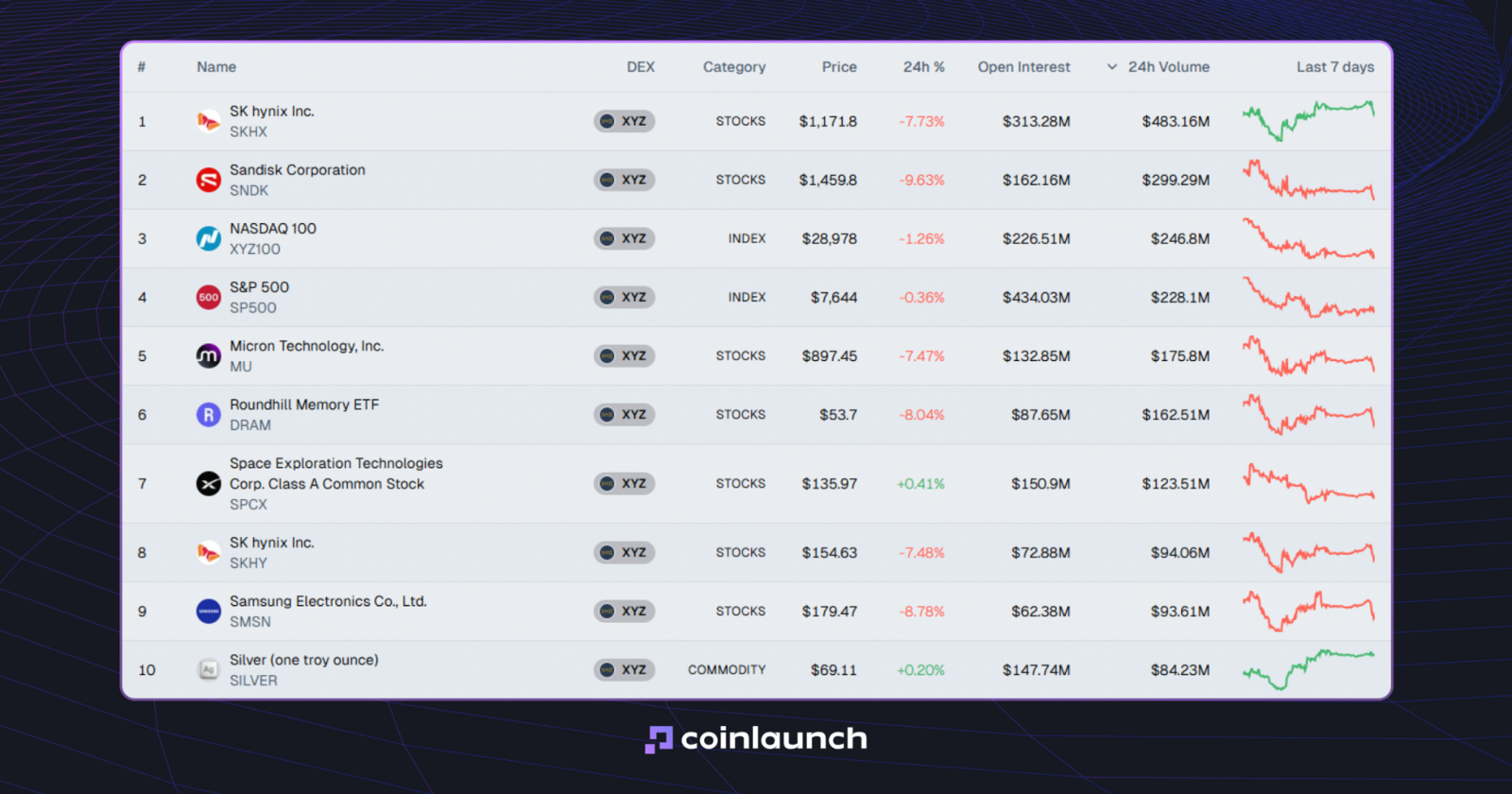
As a result, HIP-3 Hyperliquid expands far beyond traditional cryptocurrencies. Venues like TradeXYZ offer perpetual contracts tracking traditional finance assets, including stocks, indices, gold, silver, and foreign exchange rates. Products like Hyperliquid stocks and Hyperliquid stock perps do not confer equity ownership in the underlying asset, traders instead take positions on derivative price movements.
Top 10 HIP-3 markets by 24h trading volume. Source: oakresearch.io
Through goodcryptoX, these markets remain accessible within the same interface as standard Hyperliquid perps. You can apply Trailing Stop orders, multi-target Take Profits, Grid and DCA Bots, and TradingView automation to HIP-3 assets. goodcryptoX natively supports HIP-3 providers, including TradeXYZ.
Follow these steps to trade HIP-3 markets:
Connect your Hyperliquid account to goodcryptoX.
Open the pair selector.
Use the search bar to locate your target market, such as stocks, commodities, or pairs for Hyperliquid forex trading.
Select Buy or Sell, adjust your leverage, enter the position size, and select an order type.
Add TP/SL levels, set up a Trailing Stop, or deploy a Grid or DCA Bot as needed.
Submit the order and monitor your position in the Orders or Positions tabs.
Once you know how to trade stocks on Hyperliquid via goodcryptoX, the execution matches standard crypto perp trading: the underlying asset changes, but the order execution and position management tools remain identical.
Hyperliquid Trading Platform: Native App vs goodcryptoX
When comparing the Hyperliquid trading platform to goodcryptoX strictly as trading interfaces, the core differences emerge beyond standard Market and Limit orders. The native Hyperliquid trading platform provides direct market access and order execution, whereas goodcryptoX builds on top of it by adding mobile trading, advanced order types, and automated tools that the native Hyperliquid trading terminal lacks.
Parameter
Native Hyperliquid
goodcryptoX
Basic Market and Limit orders
✅
✅
Trailing Stop
Limited native functionality
✅ Trailing Buy/Sell with Trailing Start
Multiple Take Profit
Basic TP/SL
✅ Multiple TP targets for one position
Auto-Follow Stop Loss
❌
✅ SL automatically moves after TP execution
Grid and DCA Bots
❌
✅ Grid and DCA Bots with no coding required + Signals/TradingView bot via webhooks
TradingView automation
❌
✅ Webhook triggers for orders and bots
Mobile app
Android; no separate native iOS app
✅ iOS and Android
HIP-3 markets
✅
✅
Multiple exchanges and wallets
❌
✅ Unified interface and portfolio
Interface fees
Native Hyperliquid fees only
Hyperliquid fees + builder fee
Restricted regions
United States, Ontario (Canada), and sanctioned jurisdictions
No fixed list
Multiple Hyperliquid accounts
Wallets/accounts managed separately
✅ Trade and track multiple connected accounts from one interface
Conclusion: How to Start Trading on Hyperliquid
To answer how to start trading on Hyperliquid, the core process takes a few basic actions: connect a wallet or log in with an email address, deposit USD Coin (USDC), select a spot or perpetual market, adjust leverage and margin settings, and submit a Market, Limit, or other supported order. Once a trade opens, manage it directly through Take Profit and Stop Loss (TP/SL) parameters, Reduce Only options, and native Hyperliquid controls.
Traders who want to get the most out of Hyperliquid can use goodcryptoX instead. The terminal provides dedicated mobile apps for iOS and Android, Trailing Stop orders, multi-level Take Profits, Auto-Follow Stop Loss functions, Grid and DCA Bots, and TradingView webhooks. Built around a non-custodial application programming interface (API) wallet setup, goodcryptoX places and manages trades while keeping withdrawal permissions off-limits.